WordPress or Squarespace: it comes down to who does the updates
Every comparison lists features. The thing that decides it is who is doing the maintenance.

Adam Roe
The short answer
Squarespace keeps itself updated and limits what you can add to it. WordPress will do almost anything and needs somebody to apply updates to it, its plugins and its PHP every month. If nobody will look after the site, Squarespace is usually the better answer. If somebody will, and the site needs to grow, WordPress is.
On this page
WordPress vs Squarespace usually gets settled with a feature table, and both come out of it looking fine, because they are. Either will give a small business a good website it can edit itself.
What actually decides it is less exciting and much more useful to know. Somebody has to keep WordPress updated, and nobody has to keep Squarespace updated. Nearly everything else follows from that one difference.
So here is what that means day to day, what each one does better, what moving between them involves, and how to tell which suits you. If WordPress already sounds like the one, having a WordPress site built and looked after is priced on a single page. Everything about Squarespace below comes from its own help pages, and everything about WordPress from WordPress.org, checked in October 2026.
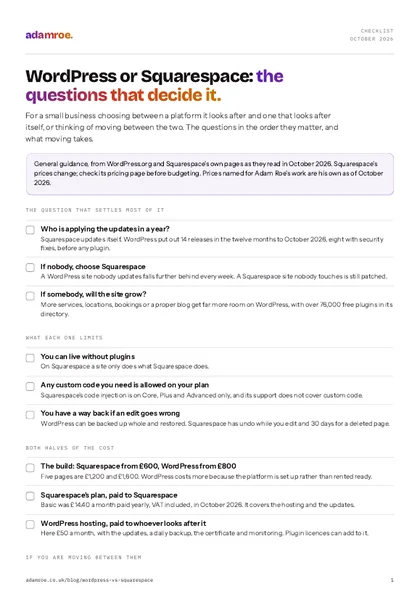 Free checklist, no email needed WordPress or Squarespace: the questions that decide it. For a small business choosing between a platform it looks after and one that looks after itself, or thinking of moving between the two. The questions in the order they matter, and what moving takes. Download the checklist
Who keeps each one updated?
On Squarespace, Squarespace does. In its own words, “We always push updates automatically”, and because Squarespace does not use plugins, an update cannot break one (moving from WordPress). The security certificate is set up for you as well (SSL certificates). There are no plugins to update, no PHP version to move, and no server for you to think about. The trade is that you can only add what Squarespace lets you add.
On WordPress, somebody does. WordPress applies its own security releases on most hosts, but plugins and themes only update themselves if somebody switches that on for each one, older sites still wait for a click on the bigger releases, and the version of PHP underneath it all is the host’s to move. In the twelve months to October 2026, WordPress itself put out 14 releases, three of them major, and eight of the smaller ones carried security fixes (release archive). That is roughly one a month before a single plugin is counted. That somebody can be you, a developer, or a plan. It just has to be somebody, every month, including the months everyone is busy.
None of that is a flaw in WordPress. It is the cost of a platform that will do almost anything, and how to secure a WordPress site goes through what the upkeep actually is.
Who does the upkeep
On Squarespace the platform does the hosting and the security updates, and there are no plugins or PHP to keep current. On WordPress each of these is a job for somebody: you, a developer or a plan.
What does Squarespace do better?
It leaves you alone. The site, the hosting, the security certificate and the updates are one subscription, and none of them ever needs you. The editor is built for owners rather than developers, and it is genuinely hard to break.
For a service business with a handful of pages, a portfolio, or a business whose site will look much the same in five years, that is exactly right. I would rather say so plainly than treat a hosted platform as the lesser choice.
What you give up is room. There are no plugins, so a site can only do what Squarespace does. Adding your own code is limited by plan: code injection, for scripts and tracking that need it, is only on the Core, Plus and Advanced plans (code injection), and Squarespace’s support team will not help with custom code. And there is no backup to restore: once an edit is saved and you leave the editor, it cannot be undone automatically (undo and redo).
What does WordPress do better?
It grows with you. More services, more locations, bookings, a members area, a proper blog with categories, or something specific to your trade: there is usually a plugin for it: WordPress.org’s directory says it has over 76,000 free ones (plugin directory). If there is not, a developer can build it, because nothing is locked.
It is also yours in a way a hosted site is not. A WordPress site is a set of files and a database. It can be backed up whole every night, put back from any of those backups, and moved to a different host without rebuilding anything. When somebody leaves my hosting, they get a full backup and a hand moving it, free, and it actually works because the site is portable by design.
The cost of all that room is the upkeep in the previous section, and that is the whole decision.
What does each cost to run?
Two numbers on either platform: building it and having it. They should never be quoted as one.
| Squarespace | WordPress | |
|---|---|---|
| One page, built | £600 | £800 |
| Five pages, built | £1,200 | £1,600 |
| Monthly, to the platform | Basic, £14.40 with VAT | nothing |
| Monthly, to me | nothing | £50, hosting with updates and backups |
| Changes after launch | £75 an hour, or a plan | £75 an hour, or a plan |
WordPress costs more to build because the platform is set up rather than rented ready, and more to run because somebody is doing the upkeep: the £50 is mostly the updates, backups and monitoring that Squarespace does for itself. So if cost is what matters most, Squarespace wins, and the real question is whether you need the room WordPress gives.
Can you move a WordPress site to Squarespace?
Yes, and Squarespace has its own importer for it (importing from WordPress). You export a file from WordPress, under Tools, Export, and upload it in Squarespace’s Import and export panel. It is a one-off copy, not a sync.
What comes across is the pages, the blog posts with their authors, categories and tags, the comments, and images attached to posts and pages. What does not is anything a plugin made, gallery images, image captions, images in the Media Library that are not attached to anything, and the design itself. Squarespace’s own advice is to download the whole Media Library first as a backup.
How to check it: count the pages and posts on both sites afterwards, and open every page that had a form, a gallery or a booking widget, because those were plugins and they will be gaps.
What goes wrong if it is missed: the addresses usually change, so every old address needs a redirect in Squarespace’s URL mappings, or the search rankings the old pages earned are lost. Replatforming without losing search traffic is the full list for that.
And from Squarespace to WordPress?
Also yes, with more left behind. Squarespace exports a file made for WordPress (exporting your site). It carries layout pages, one blog page with its posts and up to 1000 comments per post, text blocks, image blocks and gallery pages. It leaves out shop, album, cover, index, portfolio and calendar pages, more than one blog, video, audio and product blocks, drafts, your styles and any custom CSS. A trial site cannot export at all.
The images need care. Squarespace says that if you import into a self-hosted WordPress site with the WordPress Importer, the images might not migrate, and the links to them stop working once the Squarespace site is cancelled. Download them and upload them to WordPress yourself, then check every page before cancelling anything. The Squarespace handover checklist covers the rest of what stays behind.
Moving between them
Both directions carry the pages, the blog posts and the words. Both leave behind the design, anything built with an add-on, and some of the images, and both need every old address redirected to its new one.
So which one, honestly?
One question settles it more often than any feature list: who is applying the updates in a year?
If the answer is nobody, choose Squarespace. A WordPress site with nobody looking after it is a site falling a little further behind every week, and the month you are too busy to check is the month it matters.
If the answer is you, or somebody you pay, the question becomes whether the site will grow. A business that will add services, locations, bookings or a proper blog gets far more room on WordPress, and keeps the option of moving host whenever it likes. A business whose site will look much the same in five years does not need that room.
If Wix is in the running too, Wix or WordPress settles that one on what happens the day you leave, and Squarespace or Wix on what living with each is like once somebody else has built it.
What I build on either
- A WordPress site is from £800, five pages £1,600, and hosting afterwards is £50 a month with the updates, a daily backup, the security certificate, and the site put back if an update breaks something. The domain stays in your name. That is WordPress website design, and the hosting is what makes WordPress as hands-off as it gets.
- A Squarespace site is from £600, five pages £1,200, built on your own Squarespace account from the start, with a written guide at handover. Squarespace hosts and updates it, so there is no hosting to buy from me.
- Moving between them is the build on the new platform, plus moving the content across: an extra day for every 25 pages, so £400, with the formatting, images and addresses kept. Every old address gets mapped to a new one before launch.
- The recommendation comes before the quote. If nobody is going to look after the site, I will tell you Squarespace, even though WordPress is the bigger job for me.
Before you ask
Questions people ask.
01 Which is cheaper to run?
Squarespace, usually. Basic is £14.40 a month paid yearly, VAT included, and that covers the hosting and the updates. WordPress has no platform fee, but it needs hosting and somebody’s time for the updates, whether that is yours or a plan’s. Here that is £50 a month with the updates and backups included, and plugin licences can add to it. The extra on WordPress is somebody doing the upkeep, which is the part you are paying for.
02 Can I move from Squarespace to WordPress later?
Yes, partly. Squarespace exports a file made for WordPress that carries layout pages, one blog with its posts, and text and image blocks. Shop pages, other page types, video and audio blocks and your styling stay behind, and the images may need downloading by hand. So budget for a partial rebuild, and map every old address to a new one before launch so the search rankings come with you.
03 Which is safer if nobody maintains it?
Squarespace, by a distance. The platform applies its own security updates, so a Squarespace site nobody touches for a year is still patched. A WordPress site left alone for a year is a year behind on WordPress, on every plugin and probably on PHP, and that is exactly the kind of site that gets broken into. Squarespace is the honest answer for a site with nobody looking after it.
04 Can a WordPress site be looked after so I do not have to think about it?
Close to it. Hosting here is £50 a month and includes the updates every month with a check afterwards, a daily backup, a firewall, monitoring, and the site put back if an update breaks something. You still change your own words and pictures. The platform side becomes my job rather than yours, which is most of what Squarespace was offering in the first place.
If you are stuck between the two, the answer usually falls out of one conversation about who will look after it, not out of a feature table.
Tell me what the site needs to do and I will tell you which one I would pick, and why. If it is WordPress, I can get the upkeep sorted too.
adamroe.