Handing over a Wix site: the checklist
Wix moves the site between accounts. It does not move everything, and some of it is one way.

Adam Roe
The short answer
Wix moves a site between accounts with its own Transfer site button, and the invitation expires after three days. The site plan, domain, business email and premium apps only move if you tick them. Wix Payments never moves, contacts leave the old account, and transferring gives up the 14 day refund window. Mostly tick boxes and timing.
On this page
Good news to start with: Wix will move a site from one account to another for you. There is a Transfer site button built in, and on a straightforward site it takes a few minutes.
What catches people out is the rest of it. Some things only travel with the site if somebody ticks a box, and a handful of steps cannot be taken back once they have run. None of it is frightening once you know it is coming, which is really what this list is for.
This is the Wix version of the general handover checklist, which covers the eight things every handover needs, whatever the site runs on. Here is what is only true on Wix, for the business about to own the site and the designer handing it over.
Every Wix website build ends with the site in the client’s own Wix account, because a site you cannot move without asking your developer is not really yours yet. If yours is not there today, don’t worry: most of this is tick boxes.
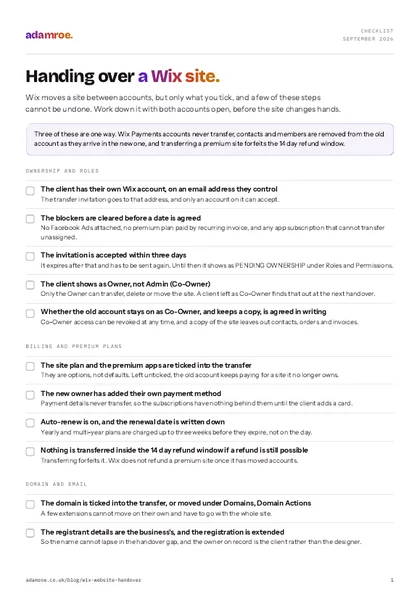 Free checklist, no email needed Handing over a Wix site. Wix moves a site between accounts, but only what you tick, and a few of these steps cannot be undone. Work down it with both accounts open, before the site changes hands. Download the checklist
What moves, and what stays behind
The transfer is opt in, which is the most useful thing to know about it. The site itself goes. The site plan, the domain and the business email, and the premium apps are tick boxes rather than defaults, so they only move if you tick them on the day. It is a removal van that loads the boxes you point at, and leaves the rest in the hall.
| Moves with the site, if you tick it | Does not move at all |
|---|---|
| The premium site plan | The Wix Payments account |
| The domain and the business email bought from Wix | The payment details behind the billing |
| Premium apps, including a Business Phone Number plan | A logo bought from Wix |
| Site contacts and site members | Email marketing statistics |
| Wix Stores products, categories and settings | Google Ads campaigns |
| Email campaigns, site media and Velo components | Velo secrets in the Secrets Manager |
That is from Wix’s article on transferring a premium site (checked September 2026), like most of what follows. A site with Facebook Ads attached cannot be transferred at all, so that is one to check early rather than on the day.
How to check it: sign in as the new owner and look for the domain under Domains and the plan under Premium Subscriptions. An unticked box leaves the client owning a site whose address, mailboxes or bill still belong to someone else. That is a second transfer to run rather than a broken website, but it is much easier to tick the box first time.
Four things you cannot take back
Most of a Wix handover is reversible, and that is worth saying first. These four are not, so they are the ones to talk through before a date goes in the diary.
Four things you cannot take back
Most of a Wix handover is reversible. These four are not, so they are the ones to talk through before a date goes in the diary.
1. Transferring gives up the 14 day refund window
Wix does not refund a premium site once it has been transferred, and the transfer closes the 14 day window for good. Nothing to think about on a site that has been up a year, worth a thought on one that went live last week.
Do this first: if a refund is still a possibility, wait until the window has passed.
2. Contacts and members leave the old account
They are moved, not copied: Wix removes contacts and members from the old account as they arrive in the new one. That is the right way round for the client, and a genuine surprise for whoever built the site, so it is worth flagging before the day rather than after it.
Do this first: export while you still have both accounts: contacts to CSV 50,000 at a time, orders for Stores, Bookings, Restaurants Orders and Donations (both checked September 2026), then products, CMS collections and the media files. Count the rows against the dashboard, because an export that stopped early looks exactly like one that finished, and it is worse than none.
3. Existing blog posts stop being editable
This is the odd one, and the one nobody expects. Wix says that after a transfer, editing existing blog posts is not possible, though new posts are fine. Comments, featuring and deleting still work, so the blog is not stuck, it just cannot be rewritten.
Do this first: make any final edits before the transfer, and try editing an old post afterwards so the client hears it from you rather than finding out in three months.
4. Moving the business email off Wix billing
Wix resells Google Workspace as business email. Moving that mailbox from Wix billing to Google directly goes through Wix Customer Care, cannot be undone, and afterwards business email cannot be bought through Wix for that domain (Google Workspace FAQs, checked September 2026).
Do this first: decide who pays for email in a year’s time, and move the mailbox once. One calm decision now, made before anybody is in a hurry.
Before you press transfer
Clear the blockers. A premium plan paid by recurring invoice stops the transfer until that invoice is cancelled, and some app subscriptions have to be unassigned first. Check Premium Subscriptions and the ad accounts a week early, rather than with the client watching.
Agree what the old account keeps. The outgoing owner chooses during the transfer whether to stay on as Co-Owner and whether to keep a copy. Co-Owner access is limited and can be revoked at any time, and the copy leaves out contacts, orders and invoices (keeping a copy of a site, checked September 2026). One line in an email settles who still has a way in.
Say out loud that nothing exports. A Wix site cannot be downloaded or hosted anywhere else: it has to run on Wix’s servers (exporting or embedding a Wix site, checked September 2026). Owning your content means the CSVs, the media and the words, and a future move means a rebuild. None of that is a reason to avoid Wix, it is just much kinder said early than discovered in two years. That is the main way Wix differs: on WordPress the job is accounts and licences (handing over a WordPress website), while the Squarespace version moves ownership in one step with the billing behind it.
Running the transfer
This is the bit everyone expects to be difficult, and it is a form. From the dashboard: the Site Actions icon on the Home page, then Transfer site. Give the recipient’s email address and your relationship to them, set the transfer options, choose whether to stay on as Co-Owner and keep a copy, then confirm.
What moves, and what stays behind
The transfer is opt in. The site itself goes, and the site plan, the domain, the business email and the premium apps are tick boxes rather than defaults, so they only move if you tick them on the day. A site with Facebook Ads attached cannot be transferred at all.
The recipient needs a Wix account on that address, and the invitation expires after three days, so send it when you know they are at a desk. While it waits it shows as PENDING OWNERSHIP under Roles and Permissions, where it can be resent, turned into a link or cancelled (managing site transfers, checked September 2026). Only the Owner can start a transfer: an Admin, which Wix also calls Co-Owner, cannot (roles and permissions, checked September 2026).
How to check it: read the client’s role in Roles and Permissions. It should say Owner. A client left as Co-Owner cannot transfer, delete or move their own site, and tends to find that out at the next handover, when it matters most. Quick to put right while everyone is still in the same email thread.
Then the billing. Payment details do not transfer, so the new owner adds their own card and checks auto-renew is on, which is two minutes at the end of the same call. Yearly and multi-year plans are charged up to three weeks before they expire (billing for premium plans, checked September 2026).
The domain, and a .co.uk change of owner
A domain bought from Wix can travel with the site, or move on its own: Domains, the Domain Actions icon, Transfer to a different Wix account. Some extensions cannot move alone and have to go with the whole site, and Wix names .at, .ch, .co.at, .de, .it and .or.at (moving a Wix domain between accounts, checked September 2026). After a domain-only move, extend the registration and update the registrant details.
The UK part that gets missed: changing who owns a .co.uk is a Nominet registrant transfer, a separate job from moving the name between Wix accounts or between registrars. Nominet charges £10 plus VAT however many names are in it, and the new registrant has five days to accept before it times out (Nominet on transferring a domain name, checked September 2026). A small fee and a form, and then the name is genuinely theirs.
If the domain ever leaves Wix for another registrar, it has to be unlocked, the EPP code goes only to the registrant contact email address, and an ICANN 60 day lock applies after a purchase, a registrant change or a previous transfer (transferring a domain away, checked September 2026). Business email is tied to both: Google Workspace bought through Wix only moves when the site, its plan and the domain move together (transferring a Google Workspace mailbox, checked September 2026).
How to check it: look the domain up in a public WHOIS and read the registrant. It should be the business, and that is the whole test.
If the site takes money
A Wix Payments account cannot be transferred, and there is nothing clever to be done about that, so build it into the plan instead. If the designer set it up, the client opens their own, with a bank account registered to them or the business and a physical address rather than a PO box. Allow seven business days for verification, and expect a request for photo ID and a bank statement (setting up Wix Payments, checked September 2026).
The part that costs real money: recurring payments from customers carry on under the original account, and those customers have to cancel and subscribe again under the new one. This is the one I would raise on the first call, because somebody has to ask those customers, and a planned email is a much nicer thing to send than an apology.
The money does not move
A Wix Payments account cannot be transferred, so the client opens their own, with a bank account registered to them or the business, and allows seven business days for verification. Recurring payments from customers carry on under the original account, and each one has to cancel and subscribe again under the new one.
How to check it: list every active subscription before the handover date and agree who tells those customers, and when. The transfer will not move them.
Third-party payment providers need verifying again in the new owner’s name, and an Avalara tax connection stays attached on the same login, which may still be the designer’s, so that one is worth opening and reading. If the business is mostly the shop, the same questions come up in handing over a Shopify store.
Search, analytics and the tidy-up
Search Console needs a premium plan and a connected domain, and the Wix SEO dashboard only works once the site is verified, so the connection must sit on the client’s Google account. Reconnect it through the SEO Setup Checklist, or by hand: SEO and GEO, Tools and settings, Site Verification, paste the meta tag (verifying a site with Search Console, checked September 2026).
Removing the old owner there is not enough: Google says the verification token has to go too, or they can simply verify ownership again (managing owners and users). In GA4 you need the Administrator role to add or change users (adding users in GA4). Both checked September 2026.
Two last jobs, and then you are done. Save the URL Redirect Manager entries for the client’s records, noting Wix caps redirects at 5,000 per site (setting up a 301 redirect, checked September 2026), then remove or downgrade everyone in Roles and Permissions who no longer needs access, the outgoing designer included.
How to check it: sign in as the client with every other login signed out, then ask the designer to confirm their own account no longer lists the site, or lists only the agreed copy. That is a friendly email rather than an accusation, and most people are glad to be asked.
What my Wix handovers include
- The site ends up in your Wix account, with you as Owner. Not Co-Owner, and not on my login with a password shared by email. Part of every Wix build, which starts at £600.
- A written guide at handover, built around the pages you will actually change, with the CSV exports and the media files, the only copy of the site that exists off Wix.
- Monthly help if you want it. Wix hosts and updates itself and bills you directly, so there is no hosting to buy from me. Changes are £75 an hour, or a monthly plan at £300 for three hours a month, £675 for eight.
- A site I did not build starts with a take-on check, £200 for half a day: the account, the roles, the domain and what has been exported, with the findings in writing.
Before you ask
Questions people ask.
01 How long does a Wix handover take?
The transfer itself takes minutes, but plan for a fortnight around it. The invitation expires after three days, so both people need to be at a desk. A new Wix Payments account can take up to seven business days to verify. And if the domain is going to leave Wix altogether, transfers away take up to seven days and an ICANN lock can hold it for sixty. Most of that fortnight is waiting rather than work.
02 Can the designer keep a copy of the site afterwards?
Yes, if it is agreed. Wix offers a copy of the site to the outgoing account as part of the transfer, and the copy leaves out sensitive data such as contacts, orders and invoices. The outgoing designer can also stay on as Co-Owner, with limited access the new owner can revoke whenever they like. Both are choices made during the transfer, so decide them in writing first.
03 What happens to customers who pay us monthly?
Recurring payments taken through the old Wix Payments account keep going to that account, because a Wix Payments account cannot be transferred. Those customers have to cancel and subscribe again under the new one. It is the single most expensive thing to discover late, so count the active subscriptions before the handover date and plan how you will ask people to re-subscribe.
04 Is my .co.uk domain really mine after the handover?
Only once the registrant has been changed to you, and it is worth checking rather than assuming. Moving a domain between Wix accounts or to another registrar is a different job from changing who owns the name, which for a .co.uk is a Nominet registrant transfer. Nominet charges £10 plus VAT however many names are in it, and the new registrant has five days to accept before it times out. A small fee and a form, and then it is properly yours.
05 Does a Wix build include the handover?
Yes, and it is not an extra. A Wix site I build ends up in your own Wix account with you showing as Owner rather than Co-Owner, plus a written guide built around the pages you will actually change. Builds start at £600. If I did not build the site, the way in is a take-on check at £200, so I know what I am looking after before I promise anything.
If you have inherited a Wix site and are not sure what you own, that is a normal starting point rather than a bad one.
Tell me where the site is and I will tell you what I would check first, whether or not you hire me. If you would rather I ran the handover, I can get that sorted.
adamroe.