Wix Bookings or Acuity Scheduling for appointments
One question settles it: are appointments a feature of your business, or are they the business?

Adam Roe
The short answer
Wix Bookings lives inside your Wix site, on one login and one bill, and only works there. Acuity is a separate subscription that works with almost any website, and does more. If appointments are a feature of your business, Wix Bookings. If appointments are the business, Acuity.
On this page
If you have been searching Wix Bookings vs Acuity to work out which diary to put on your website, the comparison is less about features than the results suggest. Both take appointments. Both send reminders. Both take a card.
The difference that matters is where the diary lives, and it decides what happens years later rather than next week. If you already know Wix is the platform, what a Wix site costs to build and to run is priced separately from any of this.
One naming thing first, because it causes more confusion than the products do.
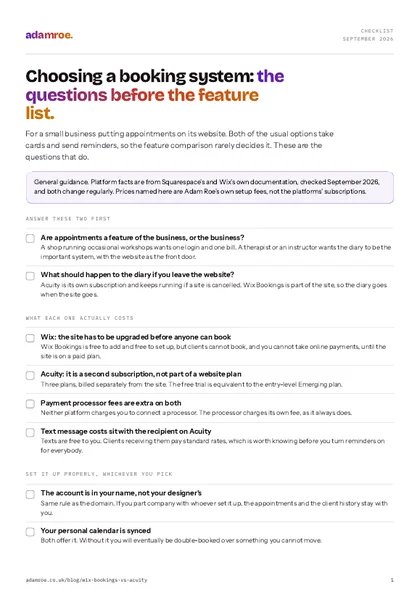 Free checklist, no email needed Choosing a booking system: the questions before the feature list. For a small business putting appointments on its website. Both of the usual options take cards and send reminders, so the feature comparison rarely decides it. These are the questions that do. Download the checklist
Squarespace Scheduling is called Acuity again
Squarespace bought Acuity Scheduling and, for a while, branded it Squarespace Scheduling. Plenty of articles and agency pages still call it that.
Squarespace’s own help centre now calls it Acuity Scheduling throughout, and describes it as a Squarespace company you can use with a Squarespace website on a single login, on its own, or with almost any other website (what Acuity Scheduling is, checked September 2026).
So there is no separate Squarespace scheduler. If somebody is quoting you for “Squarespace Scheduling”, they mean Acuity, and it is a subscription of its own rather than something included in a website plan.
What Wix Bookings does, and what it costs
Wix Bookings is a scheduling system built into Wix. Appointments, classes and courses, with the diary, the clients and the payments in the same dashboard as the pages.
It handles the things you would expect: online and in-person payment, membership plans and packages, more than one location, a booking form you can add your own questions to, email or SMS reminders to cut no-shows, and a sync with your personal calendar so a dentist appointment does not get double-booked over (about Wix Bookings, checked September 2026).
The cost is where it is genuinely simpler. Adding Wix Bookings is free, but the site has to be upgraded before clients can book, and upgraded before you can take online payments. There is no separate booking subscription. You are paying for the Wix plan, and the bookings come with it.
What Acuity does, and what it costs
Acuity is a scheduling product first, which happens to plug into a website rather than being part of one.
It does more of the things a business whose whole day is appointments needs: calendar syncing, automated email and text reminders, payment processor integrations, custom intake forms, coupons and discount packages, invoices to collect what clients owe, and deposits and cancellation policies aimed squarely at no-shows.
The cost is two bills instead of one. Your Acuity subscription is separate from your site subscription, there are three plans, and the free trial is equivalent to the entry-level Emerging plan (Acuity pricing and billing, checked September 2026). Text messages are free to you, though your clients pay standard rates to receive them, and payment processor fees are the processor’s as they always are.
Where the diary lives
Wix Bookings sits inside the website, on one login and one bill, and it only works there. Acuity is its own subscription, its own login, and it works with Squarespace or almost any other site, so it keeps running if the website goes.
The difference that actually decides it
Everything above is detail. This is the question.
Are appointments a feature of your business, or are they the business?
A garden centre that runs a few workshops has appointments as a feature. The website is the main thing, the diary is a corner of it, and having both in one login with one bill is worth more than any scheduling feature nobody will use. Wix Bookings.
A therapist, a physiotherapist or a driving instructor has appointments as the business. The website is a front door to the diary. For them the diary is the important system and the website is the accessory, which is exactly the shape Acuity is built for.
There is a second question underneath it, and it is the one people wish they had asked: what do you want to happen if you leave the website?
Acuity keeps running. Squarespace’s billing guide says plainly that if a site subscription is cancelled or expires, you can carry on using Acuity. Wix Bookings cannot do that, because it is part of the site. The diary goes when the site goes.
For a business whose clients, history and future appointments all live in that diary, that is not a small detail. It is the same ownership question that runs through what you give up for one login on Wix, and it has the same answer: convenience now, less room later.
Three shapes of business
A shop running occasional workshops has appointments as a corner of what it does, and one login with one bill beats features nobody uses. A therapist, a physiotherapist or an instructor has appointments as the whole day, so the diary is the important system and the website is the front door.
Side by side
| Wix Bookings | Acuity | |
|---|---|---|
| Where it lives | Inside your Wix site | Its own product, alongside any site |
| Logins | One | Two |
| Bills | One, the Wix plan | Two, the site and the subscription |
| Works with | Wix only | Squarespace, and almost any website |
| If the website goes | The diary goes too | The diary keeps running |
| Reminders | Email and SMS | Email and text |
| Deposits and no-show tools | Yes | Yes, and more of them |
| Intake forms | Customisable booking form | Custom forms, coupons, packages, invoices |
| Needed before clients can book | An upgraded Wix plan | An Acuity plan after the trial |
Neither column is the winner. The first is less to run and the second is harder to lose.
What I set up
Booking is an extra on a build rather than a package of its own, because what it costs depends on how you work rather than on which platform you picked.
- Online booking on the platform’s own scheduler is £400, which covers the services, the availability, the booking form and the reminders, set up around your real week rather than left on the defaults.
- £600 with deposits or payment taken at the time, which is the version worth having if no-shows cost you money.
- I will tell you when the built-in one is enough. Most small businesses do not need the more powerful diary, and paying two subscriptions to use a tenth of one is a waste I would rather talk you out of.
- The diary is set up in your account, not mine. Same rule as the domain. If we part company, the appointments stay with you.
- If you are already on Wix and it is working, leave it. Nothing here is a reason to move a diary that people are successfully booking into, and handing over a Wix site matters more than which scheduler is on it.
Before you ask
Questions people ask.
01 Is Squarespace Scheduling the same thing as Acuity?
Yes, and the name has settled back on Acuity. Squarespace bought Acuity and briefly branded it Squarespace Scheduling, which is why you still see both names in older articles and on plenty of agency pages. Squarespace’s own help centre calls it Acuity Scheduling throughout, and it is billed as its own subscription rather than as part of a website plan.
02 Do I need a paid Wix plan to take bookings?
Yes. Wix Bookings can be added to a site for free and set up while you are still building, but the site has to be upgraded before clients can actually book, and again before you can take online payments. So the real cost is the Wix plan plus whatever your payment processor charges, rather than a separate booking subscription.
03 What happens to my diary if I leave the website?
This is the useful difference. Acuity is its own subscription, so if a Squarespace site is cancelled or expires, the scheduling keeps running and your calendars and settings stay. Wix Bookings is part of the site, so the diary goes when the site goes. If the appointments matter more than the website, that is worth knowing before you choose.
04 Do you set either of them up?
Yes, as an extra on a build: £400 for online booking on the platform’s own scheduler, or £600 with deposits or payment taken at the time. That covers the services, the availability, the booking form and the reminders, set up around how you actually work rather than left on the defaults.
If you are not sure which shape your business is, that is usually a five minute conversation rather than a comparison table.
Tell me how people book with you now and I will tell you which one I would set up, and when the honest answer is that what you have is fine.
adamroe.