Replatforming without losing search traffic
The redirect map belongs in the build, not the launch retro.

Adam Roe
The short answer
Most traffic lost in a replatform goes to five things: missing redirects, redirect chains, content trimmed to fit a new template, structured data left behind, and staging settings that came along to launch. All five are preventable. Crawl the old site first, map every old URL to a 301, then check the map against production after launch.
On this page
Moving a website to a new platform is exciting. A new design, faster pages, a CMS that’s nicer to use. And it goes well far more often than the horror stories suggest.
It’s also a lot like moving house. The new place is lovely, but if you don’t tell the post office, the letters keep going to the old address. On a website, redirects are how you tell Google, and everyone who has ever linked to you, where things have moved to.
If redirects have turned up near the end of your project, as one line in the plan with a day next to it, that’s completely normal. They sound like a small technical job. But a redirect map is really a decision about every URL the old site had, and those decisions need the people who know why each page exists. That’s usually content and marketing, and launch week is the busiest week they’ll have.
So the good news is simple. Do it during the build, not after launch. That’s the redirect mapping work this article is about, and it makes a big difference to how smoothly the move goes.
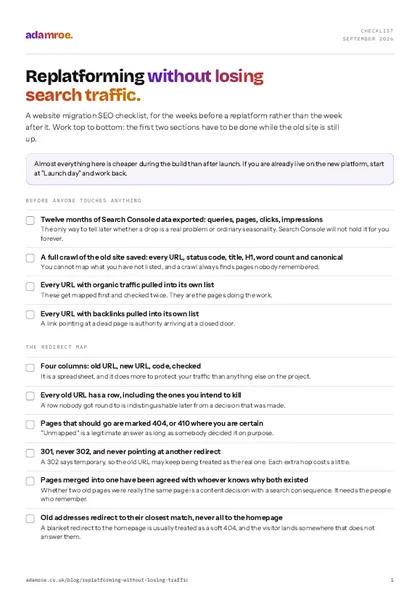 Free checklist, no email needed Replatforming without losing search traffic. A website migration SEO checklist, for the weeks before a replatform rather than the week after it. Work top to bottom: the first two sections have to be done while the old site is still up. Download the checklist
The five main causes of a traffic drop after migration
The reassuring thing is that every one of these can be prevented, and none of them needs anything clever.
1. Missing or broken redirects. One of the most common causes, and one of the easiest to prevent. Mapping every old URL to its new equivalent with a 301 is what carries across the authority those pages have built up.
How to check it: run every URL from the old crawl against the live site and record the status code and the address it finally lands on. Anything that is not a single 301 to a real page is a row that still needs a decision, and that’s fine, the list is there to be worked through. Left undone, though, the pages that earned your rankings simply stop existing, which is the biggest single drop there is.
2. Redirect chains. A URL pointing at a redirect that points at a third. This tends to happen on sites that have moved more than once, because the second migration maps from the current URLs and the first set of redirects stays as it was. Nobody does that on purpose, it’s just how a second move naturally goes. Each hop costs a little, so it’s worth pointing every old URL straight at its final home.
How to check it: follow each redirect to the end and count the hops. A crawler will show the whole chain, and so will curl -IL on a single URL. Left alone, every hop makes the visitor wait a little longer, and if the middle rule is ever tidied away the chain breaks completely rather than getting shorter.
3. Content that got shorter along the way. A rebuild is often a redesign too, and a new template can have less room for words. Nobody sets out to remove the thing a page ranked for. Copy gets trimmed to fit, a specific H1 becomes a general welcome, and a page that ranked because it answered questions in detail now says a lot less. A standard migration checklist won’t flag this, because technically nothing is broken, so it’s worth comparing old and new copy on your most important pages.
How to check it: put the old and new word counts side by side for your twenty best pages, from the old crawl and a crawl of staging, and read the H1s next to each other. A page that lost half its words usually lost the thing it ranked for. Nothing in the build will flag it, because as far as the site is concerned everything works, so this is one worth half an hour of your own eyes.
4. Structured data that didn’t make it across. Schema often lives in the old theme or a plugin, so it’s easy for it to be left behind when the templates change, and easy to miss afterwards. Rich results can disappear, click-through can fall, and rankings may follow. Happily, checking a few key pages with Google’s Rich Results Test before and after launch catches it.
How to check it: run one URL from each template through the Rich Results Test on staging, then again on the live site the day after launch, and compare both with what the old pages produced. If Search Console’s enhancement reports quietly empty out a few weeks later, this was the cause. Structured data that actually earns something covers which types are still worth carrying across.
5. Staging settings that came along to launch. A noindex still in a template, a robots.txt that still disallows everything, a sitemap pointing at staging.example.com. It’s an easy one to miss on a busy launch day and a quick one to fix, so it’s worth checking on day one.
How to check it: open https://yourdomain/robots.txt in a browser, and view source on three live pages looking for noindex. Do it on launch day and again the next morning, because launch week usually brings a few more deploys. It is a minute’s work, and worth every second of it: left up, it is the quietest way there is to remove a whole site from search, and it can take weeks to win back.
Only the first two are about redirects, which is worth knowing if somebody has handed you a checklist that only covers redirects. A good one covers all five.
Five causes of a drop
Only the first two are about redirects, which is why a redirect-only checklist can still lose traffic. Every one of them can be prevented, and each row carries the check that finds it.
Before you touch anything: the baseline
Two exports, and they’re the ones to do before anybody gets carried away, because both are very hard to recreate once the old site has gone.
Twelve months of Search Console data. Queries, pages, clicks, impressions. This is your only means of knowing later whether a drop is a real problem or normal seasonality, and Search Console’s own retention will not hold it for you indefinitely.
A full crawl of the old site. Every URL, its status code, its title, its H1, its word count, its canonical. You can’t map what you haven’t listed, and a crawl often finds pages that have been forgotten over the years: old campaign landing pages, paginated archives, PDFs that have picked up links. Every site has a few of those, and it’s much better to meet them now than on launch day.
Then pull two more lists and mark them as top priority: every URL with organic traffic, and every URL with backlinks. Those get mapped first and checked twice. Everything else matters too, but those two lists are the pages doing the most work for you.
The redirect map
Four columns, and that really is all it is. A simple spreadsheet that does more than almost anything else on the project to protect your traffic.
| Old URL | New URL | Code | Checked |
|---|---|---|---|
/services/web-design.html | /website-migration | 301 | yes |
/about-us/team/ | /about | 301 | yes |
/portfolio/case-study-4 | n/a | 410 | yes |
Three rules make it work.
Every old URL gets a row. Including the ones you already know you want rid of.
“Unmapped” is a legitimate answer, but it has to be a decision. Some pages should go. A 404, or better a 410 where you’re certain, tells search engines the page is gone on purpose rather than temporarily missing. What you want to avoid is a row nobody got round to, because later on nobody can tell whether it was a choice or an oversight.
A chain, and one hop
A chain still loads, so it is easy to miss. It happens on sites that have moved more than once, because the second migration maps from the current URLs and the first set of redirects stays as it was.
301, not 302. Once, not chained. A 302 says temporary, so search engines may keep treating the old URL as the real one. A chain adds an extra step at every hop. If the new URL for an old page is itself going to move, update the map rather than adding a second rule.
The last column is the one everybody skips, and I do understand why. Checked means somebody loaded the old URL after launch and saw where it went, not just that the rule was written. Rules can be overridden by server config, by the CDN, or by a trailing-slash setting, so it’s worth seeing each one work for yourself.
The question that needs the most care
The hard part is almost never the technology. It’s a question like whether /services/web-design and /what-we-do/design were really the same page, and no crawler in the world can answer that one for you.
It needs somebody who remembers why both exist and what each one ranks for. It takes some thought, it can easily fill a couple of afternoons on a mid-sized site, and it’s why this is best done well before launch week, while the people who can answer it still have the time to sit down with it properly.
Combining two thin pages into one strong one is often the right call and often improves things. But it’s a content decision with an SEO consequence, so it’s best made on purpose, with the right people, and written down in the map. That way nobody is put on the spot late in the build, when the new structure has one slot and there are two pages that could fill it. This is really a page structure decision arriving late, which is why the new site’s structure is worth settling before the redirect map, not after it.
Launch week: what to watch, daily
The first fourteen days are when small problems are quickest and cheapest to put right, so these are worth a look with your first coffee each morning.
- Server logs, for what search engines are actually crawling. They show exactly what’s happening, and they’re the fastest way to spot a redirect loop or a crawl trap.
- Search Console coverage: for a spike in “not found” or “excluded by noindex”.
robots.txtand a sample of page-level meta robots: on the live domain, on day one. Then again on day two, because launch week tends to bring a few more deploys.- The XML sitemap: that it exists, that it lists the new URLs, and that it does not still reference the staging hostname.
- A scripted check of the redirect map: run against production. Every old URL, every status code, every final destination. It’s quick to automate, and it catches things that spot-checking can miss.
- Core Web Vitals on the new templates: because a new hero design can slow a page down without it being obvious. The LCP piece covers the usual causes.
When each job happens
Almost all of it happens before launch, which is the point. Launch week is left with the checking, and a well-run migration on a medium-sized site can take three to six months to settle.
What “recovered” honestly looks like
A wobble is normal, so try not to read too much into week one. Search engines have to recrawl and reassess a site that changed shape, and rankings move about while that happens.
As a rough, general expectation, a well-run migration on a medium-sized site can take somewhere around three to six months to settle fully, and longer for large or complex sites. Every site is different, so treat that as a range rather than a promise.
Two things worth agreeing before launch, while there’s plenty of time to think:
What counts as recovered. Organic sessions back to the pre-migration trend line, adjusted for seasonality, not “back to the best week we ever had”.
When you’d act. A drop in week one is expected. A drop still there in week six is a problem to investigate, not to wait out. Agreeing that threshold in advance turns it into a calm, simple decision later.
The short version
Crawl the old site before anyone touches anything. Export twelve months of Search Console. Map every URL, with a real decision in every row. 301, once, no chains. Check the map against production after launch, not before. Watch the logs for a fortnight.
None of it is difficult. It’s all much easier early in the build than after launch, which is why it belongs in the scope from the start. It also belongs in the handover, because the next person to touch the URL structure needs to know what is already pointing where.
What I do on a replatform
- Redirect mapping is part of the work, not a line item at the end. It is one of the six things technical SEO covers: every old URL accounted for before launch, rather than after the traffic has gone.
- On a build I do, the redirects come with it. “Content, migration and redirects” is one of the six things in website delivery: existing pages moved across with their formatting, and every old URL mapped to a new one. The packages include 25 redirects, and more are £200 per 100 URLs.
- If somebody else is building it, the migration check is the way in. From £800, two days: every old URL mapped to a new one, the redirects tested on the staging site, a launch-day checklist for search, and a 30-minute call before you go live. It sits with the other two fixed-price audits, and a bigger site gets a day-rate quote first.
- What I would do first: crawl the current site and count the URLs, then pull the list of pages with organic traffic and the list with backlinks. Those three lists decide how big the job actually is, and they take an afternoon rather than a week.
Before you ask
Questions people ask.
01 Should I redirect old pages to the homepage?
It is a tempting shortcut, but no: send each old page to its closest match instead. A redirect to the homepage is usually treated as a soft 404, so the old page’s authority does not carry across, and the person who clicked a five-year-old link lands somewhere that does not answer them. Where there is genuinely no equivalent page, a 404, or a 410 if you are certain it has gone for good, is the honest answer and the tidier one.
02 How long should the redirects stay in place?
Keep them for at least a year, and longer if it costs you nothing, which it usually does not. Search engines need to see a redirect more than once before they treat the new URL as the real one, and old links, bookmarks and PDFs keep sending people to the old address long after search has caught up. Redirect rules are cheap to keep, so the usual reason they disappear is an honest tidy-up by somebody who did not know what they were for.
03 Do we need redirects if the URLs are not changing?
If every URL is staying exactly the same then no, and that is a lovely position to be in. Do check before you assume it, though. Trailing slashes, upper and lower case, index.php endings, www and the jump from http to https all count as different URLs, and a new platform changes at least one of them more often than not. Crawl the old site, crawl the staging site, and put the two lists side by side. The rows that differ are your redirect map.
04 Can you check our redirect map before we go live?
Yes, and before you go live is much the nicest time to ask. That is the migration check: from £800, two days, before launch rather than after. Every old URL mapped to a new one, the redirects tested on the staging site, a launch-day checklist for search, and a 30-minute call before launch. A bigger site gets a day-rate quote first. If the rebuild is already mine, the mapping is part of the build rather than a separate job.
If you are replatforming in the next six months, here’s a really useful hour to spend this week: crawl the current site and count the URLs. It often turns out to be more than anyone expected, and that’s fine. It’s much better to know now.
Think of it as telling the post office before you move, rather than after. If the list looks bigger than you’d hoped, don’t worry. Send me a message and I’ll let you know what I would map first. We will get there.
adamroe.