Handing over a Squarespace site: the checklist
Ownership moves in one step. The billing, the domain and the data do not.

Adam Roe
The short answer
To transfer a Squarespace site to a client, invite them as a contributor, have them accept, then use Transfer Ownership in Permissions and Ownership. Ownership carries the site subscription and the Squarespace domains connected to it. It does not carry the payment card, parked domains, the domain registrant details, or anything the export leaves behind.
On this page
- What changing the site owner actually moves
- First, a contributor seat, and the limit of two
- Change the site owner
- Change the card, because billing does not follow
- The domain, and what a .co.uk needs on top
- What the export does not carry
- Forms, payments and the shop
- The last pass: search, analytics and old access
- What my Squarespace handovers include
- Questions people ask
Good news to start with: this is one of the friendlier handovers there is. Squarespace has a proper panel for it, and a few clicks later the site genuinely belongs to your client.
The bit that catches everyone out is what politely stays behind. The card on file doesn’t move. Parked domains don’t move. The domain’s registrant is still whoever typed their name in years ago. And the export carries a lot less than a word like “export” suggests.
None of that is a problem on the day you know about it, so don’t worry if you are reading this the night before. It only turns into a problem three months later, when a card expires and nobody can remember whose it was.
So here’s the Squarespace half of the website handover checklist, for whoever is taking the site on and whoever is handing it over. It’s the last thing I do on every Squarespace site I set up, and everything below comes from Squarespace’s own help pages, linked and checked in September 2026. Put the kettle on, most of it is clicking.
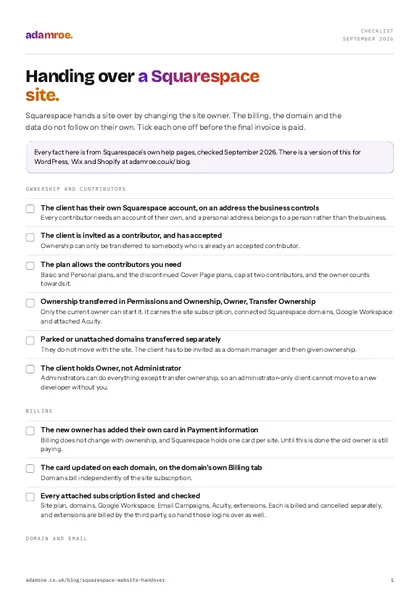 Free checklist, no email needed Handing over a Squarespace site. Squarespace hands a site over by changing the site owner. The billing, the domain and the data do not follow on their own. Tick each one off before the final invoice is paid. Download the checklist
What changing the site owner actually moves
The transfer is called “Change the site owner”, and it lives in the Permissions and Ownership panel. It takes the site and most of what is attached to it. What it does not take, and this is the whole point of the article, is the money.
| Moves with the site owner | Needs its own step |
|---|---|
| The site subscription and attached ones | The payment card |
| Connected Squarespace domains | Parked domains, not attached |
| Google Workspace tied to it | Acuity not tied to a website |
| Attached Acuity subscriptions | Squarespace Payments, Capital, Balance |
| The domain’s registrant details |
Both columns come from changing site ownership and taking over a Squarespace site.
It is a bit like handing over the keys to a shop while the rent still goes out of your account.
What the owner change moves
Change the site owner takes the site and most of what is attached to it. What it does not take, and this is the whole point, is the money. Each thing on the right needs its own step.
First, a contributor seat, and the limit of two
Before anything can move, your client needs their own Squarespace account, on an email address their business controls, and they have to accept a contributor invitation. Ownership only ever goes to somebody who has accepted, and only the current owner can start it. Nothing dramatic, it just has to happen in that order.
Check the plan before you promise a date. Basic and Personal plans, and the discontinued Cover Page plans, allow two contributors at most, owner included (contributors basics, checked September 2026). On a small site that is often the developer and one other person.
Pick the role with care: a website editor cannot add, reorder or delete pages, change styles, edit URL slugs or add code (permissions explained, checked September 2026).
How to check it: the client signs in with their own account and sees the site on their dashboard. If they can’t, the transfer panel won’t offer them as an option, and that is a five minute fix rather than a problem.
Change the site owner
In Permissions and Ownership, click your name under Owner, then Transfer Ownership. Squarespace asks you to log in again, then you choose the new owner and confirm. That’s it. It’s the part everyone expects to be the hard bit, and it takes about a minute.
Make sure the client ends up as Owner, not Administrator. An administrator can do nearly everything except transfer ownership, so a client left as one cannot move the site to a new developer without you.
How to check it: open the panel again and read it. The client is under Owner, and you are not. Left as it is, their website quietly lives in somebody else’s account, which is the thing this whole article exists to prevent.
Change the card, because billing does not follow
Here’s the one that bites late, and to be fair to Squarespace, they say it plainly: “The billing information on file doesn’t change automatically when ownership of a site changes.”
So the new owner adds their card in the Payment information panel at account.squarespace.com, straight after the transfer. Squarespace holds one card per site, and domains bill independently from their own Billing tabs (updating billing, checked September 2026).
Then check every subscription: the plan, each domain, Google Workspace, Email Campaigns, Acuity, extensions. Each is billed and cancelled separately, and extensions are billed by the third party, so hand those logins over.
How to check it: read the card in Payment information, then on every domain’s Billing tab. Miss it and the outgoing developer is charged at renewal.
The domain, and what a .co.uk needs on top
Moving the domain to another registrar. Unlock it and request the transfer code, which Squarespace emails to the registrant within 24 hours. Manager access is not enough to receive it, and transfers can take up to 15 days (transferring a domain away, checked September 2026).
Changing who owns the name. On a .co.uk that is a Nominet registrant transfer, which is not the same job. Nominet charges £10 plus VAT however many names are involved, and the new registrant has five days to accept before it times out (Nominet, checked September 2026). Squarespace names .co.uk as a country-code domain with different rules but does not set them out, so check that side with their support.
A domain transferred on its own also disconnects from its site. DNS, nameservers and forwarding survive, the payment method is removed, and registrant details do not change by themselves: that is Domain registration data, approved from both email addresses, with a contact update lock afterwards (changing domain ownership, checked September 2026). Only the owner can turn auto-renew on.
How to check it: the registration data shows the business’s name, and auto-renew is on. Miss it and the account changes hands while the domain is still the developer’s.
Email, if it runs through Squarespace
Squarespace resells Google Workspace: billed through Squarespace, used through Google (Google Workspace, checked September 2026). Give the client the Administrator option in Workspace, and clear any past due balance, or the subscription will not transfer with the domain.
How to check it: no Squarespace login uses an address on that domain. If one does, change it before the email billing moves, or that person loses their email and their website on the same afternoon.
What the export does not carry
The export is an XML file aimed at WordPress. It carries layout pages, one blog page with its posts and up to 1000 comments per post, gallery pages, text and image blocks, and the text from embed blocks.
It leaves out store, album, cover, index, info, calendar and portfolio pages, page-specific headers, footers and sidebars, extra blog pages, dropdowns, audio, product and video blocks, drafts, style settings, custom CSS, form submissions, member data and orders. Images cannot be exported in bulk, content cannot be moved from one Squarespace site into another, and a trial site cannot export at all (exporting your site, checked September 2026).
There is no backup and no restore either. Deleted pages sit in Deleted Pages for 30 days, there is no revision history, and code deleted from code blocks, code injection or custom CSS cannot be recovered (lost content, checked September 2026). What does come out cleanly is CSV: products, contacts and orders (exporting orders, checked September 2026).
What you can take with you
Products, contacts and orders come out cleanly as CSV. The XML export is aimed at WordPress and carries up to 1000 comments per post. Images cannot be exported in bulk, a trial site cannot export at all, and there is no backup and no restore.
How to check it: take every export before anything changes and count the rows against the site. Nothing breaks that day. It breaks the day the business wants to move platform.
Forms, payments and the shop
Form storage is set per form, and the default destination is the account email of whoever added it. It does not update when that person’s address changes (form storage, checked September 2026). Point each one somewhere the business controls.
Where the forms send
Form storage is set per form, and the default destination is the account email of whoever added it. It does not update when that person's address changes, so open each one and point it somewhere the business controls: their own inbox, the contacts panel, Google Drive or a Mailchimp audience.
Squarespace Payments has a single Payments Manager, the contributor who created the account. Handing it over is Settings, Selling, Payments, Manage settings, then Change under Payments manager, with two-factor on. The old manager then loses the financial beneficiary role and bank account management (transferring a Payments account, checked September 2026). Whether it is available in the UK is not stated there, so check what the site actually uses.
Stripe, PayPal and Square get reconnected to the client’s own accounts, and only owners and administrators can do it. Disconnecting Stripe cancels active subscription products and stops card and Apple Pay checkout. Payouts live in the processor’s dashboard, and the Stripe FAQ does not cover refunds on old orders after a swap, so agree that first.
How to check it: send a test enquiry through every form, then a small test order. Miss it and enquiries keep landing in the last developer’s inbox.
The last pass: search, analytics and old access
Search Console connects through the Analytics panel: Search keywords, then Connect. To move it to the client’s account, disconnect and connect again, then allow 72 hours (Search Console, checked September 2026). On Google’s side, removing a verified owner is not enough: their verification token has to go too, or they can verify again (owners and users, checked September 2026), and changing GA4 users needs the Administrator role (access management, checked September 2026).
Redirects live in Developer tools, URL mappings, as /old -> /new 301. The field holds 400 KB, around 2500 lines, a redirect only works once the original page is deleted or disabled, and a line higher up wins (URL mappings, checked September 2026). They are not in the export, so copy them into a text file.
Then the access. Reduce the outgoing developer to whatever the arrangement needs, or remove them, and check who gets which notifications: a billing contributor gets billing emails that cannot be switched off. Reconnect the social accounts, Google Drive, Mailchimp, Zapier and any extensions, so none sit on a personal login.
How to check it: sign in to Search Console and Analytics as the business, every developer login signed out, and see real data. Skip it and a year later former suppliers can still edit the website.
If the site is built elsewhere, the job differs again: handing over a WordPress site is mostly accounts and licences, a Wix site moves between accounts, and a Shopify store is three handovers in one.
What my Squarespace handovers include
- The site is built on your own Squarespace account from the start, with the domain in your name, so there is nothing to transfer at the end. It is the first thing on the Squarespace package, from £600.
- A written guide at handover, built around the pages you will actually change, plus the logins, where every form sends, and a copy of any custom code.
- Monthly help only if you want it. Squarespace hosts and updates itself, so there is no hosting to buy from me. Changes are £75 an hour, or a monthly plan from £300 a month for Manage: three hours of changes and a reply within 12 working hours.
- A site I did not build starts with a take-on check, £200, half a day. I go through the ownership, the billing, the domain and the forms, and the findings come in writing either way.
Before you ask
Questions people ask.
01 Can I move a Squarespace site into a different Squarespace account?
Yes, by changing the site owner rather than by exporting anything. Squarespace says content cannot be exported from one Squarespace site and imported into another, so the built-in transfer is the only route. The person receiving it has to be an accepted contributor first, and only the current owner can start the transfer.
02 Does the Squarespace subscription move with the site?
The site subscription moves with the ownership transfer, along with other subscriptions attached to that site. The payment card does not. Squarespace holds one card per site, and it stays as it was until the new owner replaces it in the Payment information panel. A subscription also cannot be moved from one site to another, so the transfer is the only tidy way.
03 What happens to my form submissions when the site changes hands?
Nothing, which is the problem. Form storage is set per form, and the default destination is the account email of whoever added that form. It does not update when ownership changes or when that person’s address changes. Every form has to be opened and pointed at the client’s own inbox, contacts panel, Google Drive or Mailchimp audience, one at a time.
04 Is a Squarespace site backed up?
No. There is no site backup and no restore. Deleted pages and posts sit in Deleted Pages for 30 days and then go for good, there is no revision history, and code deleted from code blocks, the code injection panel or the custom CSS panel cannot be recovered at all. Keeping a copy of the custom code in a document is Squarespace’s own advice.
05 Does a Squarespace package include the handover?
Yes, and it starts at the beginning rather than the end. The site is built on your own Squarespace account, so there is no ownership to transfer when we finish, and you get a written guide built around the pages you will actually change. A Squarespace site starts at £600. A site I did not build starts with a take-on check, £200.
If you have just been handed a Squarespace site and are not sure whose name anything is in, don’t worry. It is all checkable in an afternoon.
Tell me where the site is and I will tell you what I would check first. If you would rather I went through the list with you, I can get that sorted.
adamroe.