Squarespace or Wix: the differences once someone else has built it
The comparison that matters is not the builder. It is what happens when you want to change something.

Adam Roe
The short answer
Both build a good small site. The differences show after launch: Squarespace keeps every block on a grid, so pages tend to stay lined up, while Wix lets you put anything anywhere and keeps a history of every save to roll back to. Neither lets you take the whole site elsewhere.
On this page
If somebody else built your website on Squarespace or Wix, good news first: both are perfectly good homes for a small business site, and nothing here is a reason to move.
What is worth knowing is how they differ once the site is built. Most Squarespace vs Wix comparisons are for people choosing a builder to make their own site. This one is about living with a finished one: changing it, sharing it, fixing it, and one day leaving it. It works just as well if you are about to have one built, and if you are leaning towards Squarespace, a Squarespace site set up so it runs itself is priced on one page.
Everything below comes from Squarespace’s and Wix’s own help pages, linked and checked in October 2026.
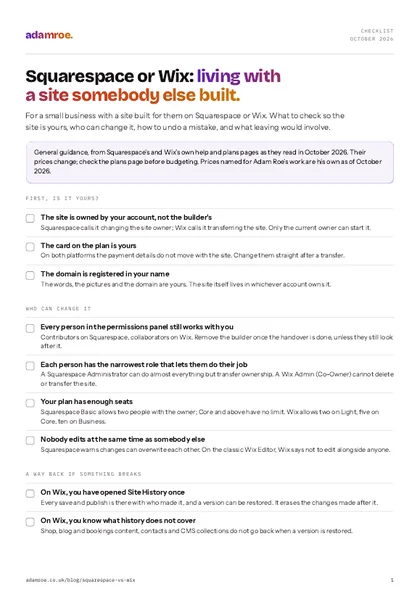 Free checklist, no email needed Squarespace or Wix: living with a site somebody else built. For a small business with a site built for them on Squarespace or Wix. What to check so the site is yours, who can change it, how to undo a mistake, and what leaving would involve. Download the checklist
What is editing like on each?
Squarespace puts everything on a grid. Its editor, Fluid Engine, shows a grid when you drag a block, and blocks sit on it (Fluid Engine). You can still overlap blocks if you want to, and moving one can nudge its neighbours (moving blocks), but because everything lines up with something, a page tends to stay tidy after a few edits.
Wix lets you put anything anywhere. The classic Wix Editor places each element where you drop it, with rulers, gridlines and snapping as aids rather than rules (editor tools). That is real freedom, and it is also how a text box ends up overlapping a photo after somebody makes the font bigger. Wix now has three editors: the classic Wix Editor, Wix Studio, and Wix Harmony, which mixes drag and drop with an AI assistant (Wix Harmony). A site stays in the editor it was built in, so which one you have depends on who built it (moving to Studio).
Both have a separate phone layout. On Squarespace you can arrange blocks for mobile without changing the desktop layout, and Squarespace recommends reviewing the mobile layout as you make changes (mobile layouts). On the Wix Editor, changes to the desktop site carry through to mobile, but changes made on mobile stay on mobile (the mobile editor). On either, look at the page on your phone after adding something new.
How to check which you have: open the editor and drag a block. A grid appearing behind it is Squarespace’s Fluid Engine. On Wix, the top of the editor tells you whether it is the Wix Editor, Wix Studio or Wix Harmony, which matters when you look up help.
Living with each one
Squarespace keeps every block on a grid, so pages tend to stay lined up. Wix lets you place anything anywhere and keeps a history of every save you can roll back to. Neither hands you the whole site to take elsewhere.
Can you add people without handing over the keys?
Both platforms let you invite people with a role, so a member of staff can change the words without being able to cancel the subscription.
On Squarespace, the owner can invite contributors and give each one permissions. An Administrator “can do almost everything the owner can, except transfer ownership”, and there are narrower roles such as Billing, Store manager and Analytics (contributor roles). On the Basic plan that is one contributor, two people in all with the owner, and Core and above have no limit (inviting a contributor).
On Wix, you invite collaborators from Roles and Permissions in the site’s settings, and each takes a role such as Admin (Co-Owner) or one of the narrower ones (roles and permissions). How many people depends on the plan: two on Light, five on Core and ten on Business, and a free site gets one (inviting collaborators). Even an Admin (Co-Owner) cannot delete or transfer the site or connect a domain, which is exactly the protection you want.
On either, avoid two people editing at once. Squarespace warns that contributors’ changes can overwrite each other, and Wix says not to edit in the classic Wix Editor at the same time as someone else (Studio and Harmony are built for it).
How to check it: open the permissions panel on either platform and read the list. Every name should be somebody who still works with you, with the narrowest role that lets them do their job.
What goes wrong if it is missed: the person who built the site is still an administrator two years later, and so is the agency before them.
What if somebody breaks something?
This is the difference most people only find out about on a bad day.
Wix keeps a site history. Every save and every publish is recorded with who made it, and you can restore an earlier version from the Site History page (site history). It does not cover everything: restoring does not roll back the content in Wix Stores, Wix Blog, Wix Bookings and several other apps, or your contacts and inbox, and restoring a version erases the changes made after it (what does not revert). For the pages and the design, though, it is a genuine safety net.
Squarespace has undo, and not much more. You can undo changes while you are editing a page, but once you exit the page, “any changes you made can’t be undone or redone anymore” (undo and redo). Squarespace says plainly that it “doesn’t have auto-save or revision history features when editing” (lost content). A deleted page or blog post can be restored within 30 days, but deleted products, events, gallery images and code cannot (restoring deleted pages). There is no site backup to roll back to.
What can be put back
On Wix the pages and the design can be rolled back to any saved version, though shop, blog and bookings content stays as it is. On Squarespace an edit can be undone until you exit the page, and a deleted page comes back within 30 days. After that there is nothing to restore.
How to check it: on Wix, open Site History once and see what is there. On Squarespace, keep a copy of any custom code and of the words on pages that took a long time to write, because nothing else will.
What does each cost to keep?
Both bill you directly, on your own card, and neither needs hosting from anybody else.
| Squarespace | Wix | |
|---|---|---|
| The cheapest plan, paid yearly | Basic, £14.40 a month with VAT | Light, £9 a month plus VAT |
| Taking payments | Any plan, though Basic adds a 2% store fee | Core and above: Core is £16 a month plus VAT |
| People who can edit | Two on Basic, no limit on Core and above | Two on Light, five on Core, ten on Business |
| Card fees with their own payments | 2.0% + 25p on Basic and Core | 2.1% + 20p |
Squarespace shows its UK prices with VAT and Wix shows them without, so the table does too. Both are from the plans pages as they read on 26 October 2026 (Squarespace pricing, Wix plans, Wix Payments fees). A site built in Wix Studio is on Studio’s own plans instead.
The prices change, so check the figure on the platform’s own plans page before budgeting. Changes after launch cost the same on either here: £75 an hour, or a monthly plan if there are enough of them.
What happens if you want to leave?
First, make sure it is yours to leave with. On both platforms the site sits in somebody’s account. If that is still the person who built it, they can transfer it to yours. Squarespace calls it changing the site owner, and Wix calls it transferring the site to another Wix account. On both, the payment card does not move with the site: Wix says “Your payment information is not transferred” (transferring a site), and Squarespace says the same of its billing. The checklists for handing over a Squarespace site and handing over a Wix site go through each step.
Make it yours, in this order
Ownership moves first, because only the owner can change the rest. The card does not move with the site on either platform, so it is changed by hand straight after. The domain is a separate registration, and it should be in your name whichever platform the site is on.
Then, what comes with you. Squarespace exports a file made for WordPress that carries the ordinary pages, one blog, and text and image blocks, and leaves the shop, other page types and the styling behind (exporting). Wix does not export a site at all. Its own help page says your site “must run on Wix’s servers”, while the content you build on it belongs to you (exporting a Wix site), so the words and pictures can be copied out and the site is rebuilt. Either way, moving platform means rebuilding the design, and every old address needs redirecting to its new one.
So which suits you?
If you, or whoever runs the site day to day, will be editing it and you want pages that stay tidy, Squarespace is the calmer one to live with. If you want bookings and a small shop in one login and freedom over the layout, and you are happy to stay on Wix, Wix gives you more, and its history is a real comfort.
Neither is better for Google. Both let you set a title and description on every page and both make a sitemap. Where the settings live is in the Squarespace and Wix SEO checklist. If WordPress is in the running too, Wix or WordPress covers that pairing.
What I do on either
- A new site on either is from £600, and five pages is £1,200. It is built on your own account from the start, so there is never anything to transfer, with a written guide at handover built around the pages you will actually change. That is Squarespace website design, and Wix is the same price.
- A site somebody else built starts with a take-on check, £200, half a day. I go through whose account it is in, the billing, the domain and where every form sends, and the findings come in writing either way.
- Changes afterwards are £75 an hour, or Manage at £300 a month for three hours of changes and a reply within 12 working hours. Neither platform needs hosting from me.
- Moving off Wix is quoted as a build, because that is what it is, with every old address mapped to a new one before launch.
Before you ask
Questions people ask.
01 Can I move a site from Wix to Squarespace?
Only by rebuilding it. Wix has no export that another platform can read, so the pages are built again on Squarespace and the words and pictures copied across. It is a normal job and not a disaster, but budget for a build rather than a move, and set up a redirect from every old address to its new one in Squarespace’s URL mappings before launch, so the search rankings come with you.
02 Which is better for SEO?
Neither, in any way that matters for a small business. Both let you set a title and description on every page, both make a sitemap, and both let you redirect old addresses. What decides whether a site is found is the pages, the words and the Business Profile, which is the same work on either. The settings live in different places, which is the only real difference.
03 Do I own the site on either?
You own the words, the pictures and the domain, if it is registered in your name. The site itself lives in an account on the platform, so what matters is whose account. If the person who built it still owns it, ask them to transfer it to yours. Both platforms have a proper transfer for it, and on both the payment card has to be changed separately afterwards.
04 Can you take over a Squarespace or Wix site somebody else built?
Yes. It starts with a take-on check, £200 for half a day, where I go through whose account it is in, the billing, the domain and where every form sends, and you get the findings in writing either way. After that, changes are £75 an hour, or Manage at £300 a month for three hours of changes and a reply within 12 working hours.
If you have been handed a Squarespace or Wix site and are not sure whose account it is in, don’t worry. That is the most common thing I find, and it is quick to put right.
Tell me where the site is and I will tell you what I would check first. If it needs moving into your name, I can get that sorted.
adamroe.