
The short answer
WordPress has no owner record and no transfer button, so a handover is really four: the domain, the hosting account, the WordPress administrator logins, and every paid plugin, theme and service licence. None of it is hard. Move each into the owner’s name, write down who holds what, take your own backup, then clean up the old access.
On this page
- The hosting account, and whose card is on it
- The domain and the email
- Admin users: one login each, nothing shared
- Plugin and theme licences
- Backups, and the file that looks like one
- Search, analytics and the sitemap
- Updates, HTTPS and the settings underneath
- The access clean-up, last
- What I hand over on a WordPress site
- Questions people ask
A WordPress website has no owner field. There is no record inside it that says whose site this is, and no button that hands it to somebody else.
That sounds worse than it is, so let’s get that out of the way first. It just means a WordPress handover is a different shape: you are not moving a website, you are handing over four sets of accounts. The registrar, the host, the administrator logins, and every vendor behind a paid plugin, theme or service. Get all four into the right name and the site is properly yours. It is closer to changing the names on the utility bills after a house move than to anything technical: dull, ordinary, and much easier done in one afternoon than in four.
This is the WordPress version of the eight things every website handover should cover, so all of that still applies. Below is what WordPress does differently. A WordPress build or move is the same list, done at the start instead of the end, which is a much calmer way round.
Nothing in WordPress records any of it, so the document you write is the record. Which sounds like homework and really isn’t: Tools, Site Health, Info copies the technical half to the clipboard in one go (WordPress, checked September 2026). There is more of it here than on a hosted platform, which is why a Squarespace handover is a different job rather than a smaller one.
The four accounts a WordPress site is made of
-
01
Registrar
where the domain lives
The domain and its DNS. A .co.uk change of owner is a Nominet job of its own.
Left behind: the nameservers move and the MX records do not, which is how email goes down mid-handover.
-
02
Host
where the files and the database live
The hosting account, and whose card is on it.
Left behind: no invoice, no support ticket, and goodwill is the only lever left.
-
03
WordPress admin
the logins inside the site
One named account per person, two-step on, nothing shared.
Left behind: one login cannot be revoked without locking everybody else out.
-
04
Vendor licences
plugins, themes, paid services
Every paid licence: buyer, account, renewal and cost.
Left behind: the plugins keep working while the updates quietly stop.
get all four into your name
and the site is properly yours
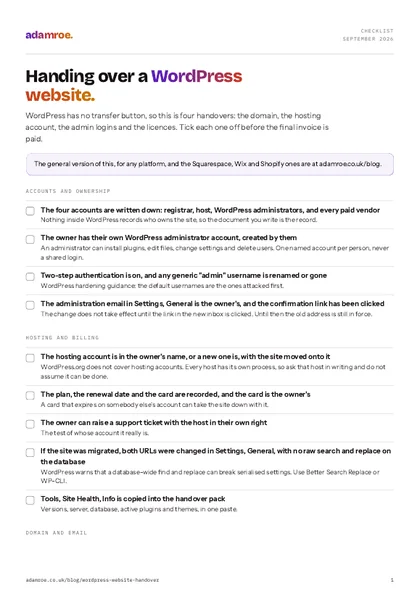 Free checklist, no email needed Handing over a WordPress website. WordPress has no transfer button, so this is four handovers: the domain, the hosting account, the admin logins and the licences. Tick each one off before the final invoice is paid. Download the checklist
The hosting account, and whose card is on it
WordPress.org says nothing about hosting accounts, and fairly enough, because a host has nothing to do with WordPress. Every host has its own process for changing the account holder, the billing contact and the card, so ask what theirs is in writing, and do not assume it can be done. If the answer is no, that is fine too, there is a way round it.
Where it cannot, open a new account in the owner’s name and move the site. It is a well worn path rather than an adventure, and WordPress documents that route: back up the files and the database, edit wp-config.php with the new database name, user and password, upload, import, then change both URLs in Settings, General (WordPress, checked September 2026). The same page warns that a search and replace across the database can cause “issues with data serialization”, and points at Better Search Replace or WP-CLI.
How to check it: the owner signs in, sees an invoice on their own card, and can raise a ticket. Until that is true, the only lever they have is goodwill, which usually works and shouldn’t have to.
The domain and the email
A .co.uk change of owner is a Nominet registrant transfer
Two jobs with similar names, which is exactly why one of them gets missed. Changing who owns a .co.uk is a registrant transfer handled by Nominet, and it is separate from moving the domain between registrars. Your registrar may do it for you, so that is the first thing to ask. Otherwise it happens in a Nominet Online Services account, costs £10 plus VAT however many names are moving, and the new registrant has five days to accept before it times out (Nominet, checked September 2026). A small fee and a form, and then the name is genuinely theirs.
Moving the name to a different registrar is the second job: the losing registrar takes the lock off and issues a transfer authorisation code for the registrant, and how long that code lasts varies, so ask on the day rather than planning around a number (Nominet for registrars, checked September 2026).
The records that carry your email
Write the DNS zone down before anything moves: the A record, www, the MX records, and every TXT record for SPF, DKIM, DMARC and verification. It is the least glamorous note you will make all week, and it is the one that saves the worst phone call, because moving nameservers without carrying the MX records across is the classic way to take a client’s email down mid-handover. The site’s own mail goes through wp_mail() and PHPMailer, which leans on PHP’s mail() function by default, so the documentation suggests a mailing service or an SMTP plugin (WordPress, checked September 2026).
How to check it: send a real enquiry through the contact form after the move, and note which service sent it. Worth the two minutes, because a silent form looks exactly like a quiet month, and nobody goes looking for weeks.
Admin users: one login each, nothing shared
An administrator can install plugins, edit files, change any setting and delete other users. WordPress puts it plainly: on a single site installation, administrators are in effect super admins (WordPress, checked September 2026). So this is the place to be a bit fussy, and being fussy here costs nothing: one named account per person, created by that person, with two-step authentication on, the default role for new users set to Subscriber, and any generic admin username renamed, because default names are attacked first (Hardening WordPress, checked September 2026).
The administration email address in Settings, General is separate from anyone’s login email, and it only changes once the confirmation link sent to the new address is clicked. Until then the old address is in force (WordPress, checked September 2026). Worth clicking that link together before anyone calls it done, rather than assuming it happened.
How to check it: the owner signs in and sees themselves as Administrator under Users, with no pending email change. Where everyone shares one login, it cannot be revoked without locking out everybody, and untangling that is a fiddly hour rather than a disaster.
Plugin and theme licences
This is the one that gets forgotten, and it gets forgotten because nothing breaks. Paid plugins and themes belong to an account, not to a website, so list each one with its buyer, the account that holds it, the renewal date and the cost.
Whether a licence can move at all is up to the vendor, and they all do it differently. Elementor has a Transfer Subscription option and a Switch Account option in WP Admin, though each plan limits the number of domains and the receiving account gets no refund on the original purchase (Elementor, checked September 2026). On WooCommerce.com a transfer moves ownership and billing together, accepted from the new holder’s My Account page, and it cannot be undone (WooCommerce, checked September 2026). Where a vendor offers nothing, you buy the licence again in the owner’s name, which is annoying rather than difficult, and worth pricing in before anyone is surprised by it.
If the site sells, the payment gateway is another account again: Stripe or PayPal must be the owner’s own, and changing the owner of a Stripe account is its own process (Stripe, checked September 2026). Handing over a Shopify store covers the platforms that own the store record themselves.
How to check it: Dashboard, Updates a month later shows a live licence on the owner’s account. Put it in the diary, because the plugins keep working while updates quietly stop, and nothing on the site tells you.
Backups, and the file that looks like one
Tools, Export is not a backup, and nobody should feel silly for thinking it is, because it sits right there in the menu looking exactly like one. It makes a WXR file of posts, pages, custom post types, comments, custom fields, categories, tags and users (WordPress, checked September 2026), with no theme, no plugins, no settings and none of the media files.
A real backup is the database plus the files, because the database sits outside the WordPress directory and downloading the folder does not catch it: core, themes, plugins, uploads, wp-config.php and .htaccess. WordPress suggests weekly for a small site, daily for a busy one, always before an upgrade, and warns that getting your site out of a host’s own server backup takes a support request (WordPress, checked September 2026). Restoring goes files first, then the database.
Export is not a backup
Tools, Export makes a WXR file of posts, pages, custom post types, comments, custom fields, categories, tags and users, with no theme, no plugins, no settings and none of the media files. A real backup is the database, which sits outside the WordPress directory, plus the files.
How to check it: the owner holds a copy away from the hosting account and knows how old it is. Get that one thing right and the worst day stops being somebody else’s support ticket, on somebody else’s timescale.
Search, analytics and the sitemap
Add the new owner as a verified owner in Search Console, then remove the old access. Taking somebody off as a user is not enough: their verification token has to go too, or they can verify themselves again. A token can be an HTML file in the site root, a meta tag on the homepage, a DNS record, or a linked Analytics or Tag Manager account (Google, checked September 2026). On WordPress the first two hide well: the file sits in a folder nobody opens, the meta tag in an SEO plugin’s settings. So those are the two to go and look at, and neither takes long to find once you know they exist.
In Analytics 4, adding or changing users needs the Administrator role, under Admin, Access Management (Google, checked September 2026). Core WordPress has made a sitemap at /wp-sitemap.xml since version 5.5 (WordPress, checked September 2026) and SEO plugins usually replace it, so confirm which one Search Console has.
How to check it: sign in to both as the owner, with every developer login signed out. Skip it and the last developer keeps a quiet way back into the search data, almost always without meaning to.
Updates, HTTPS and the settings underneath
Somebody has to apply the updates, so decide who, and write it down. One sentence in an email counts. Since 5.6, new installations have automatic core updates on for minor and major releases, while older ones keep whatever they had unless somebody changed it. WP_AUTO_UPDATE_CORE in wp-config.php overrides the Updates screen, and WordPress strongly discourages turning minor updates off (WordPress, checked September 2026). Plugin and theme auto-updates are opt in, item by item from the Plugins screen, run twice a day through WP-Cron, and email the owner either way (WordPress, checked September 2026).
Then the settings underneath: confirm HTTPS works, record who renews the certificate, and set FORCE_SSL_ADMIN in wp-config.php where it is wanted (WordPress, checked September 2026). Set DISALLOW_FILE_EDIT so nobody edits theme files in a browser, and use SFTP rather than FTP. Two things WordPress says nothing about, so record rather than assume: who holds any CDN or Cloudflare account, since that controls DNS and the cache, and whether a staging site exists and who publishes from it.
How to check it: a month later there is an update email and no stack of red numbers. Worth pinning down, because this one goes wrong quietly: nobody updates anything, because both sides assumed the other one was.
The access clean-up, last
Do this once everything else is working, not before. There is no prize for being quick here. Open Users, remove accounts for people who have gone, and drop anyone who does not need administrator to the role they use. Rotate what the outgoing developer held: SFTP or SSH credentials, the database password in wp-config.php, and any API keys made for the build. Then remove or reduce the developer’s own account.
The access clean-up, last
Done once everything else is working, not before. Remove accounts for people who have gone, drop anyone who does not need administrator to the role they use, and rotate what the outgoing developer held.
How to check it: read the Users list out loud with the owner and let them name every person on it. It takes a minute, it is oddly satisfying, and left undone it is how access stays open for years.
What I hand over on a WordPress site
All of this is easier done at the start, so that is where I put it.
- The domain is registered in your name before anything is built, and premium licences are bought in your name or passed on at cost. A WordPress build is from £800, and ends with a written guide built around the pages you will change.
- Hosting is £50 a month: the certificate, a daily backup, uptime and security monitoring, monthly updates with a check afterwards, the site put back if an update breaks it, and a note of what was done. That is the hosting plan in full, with changes at £75 an hour.
- If you leave, the handover is free. A month’s notice once the first three months are up, then a full backup and help moving it. The domain was always yours.
- If you have inherited a WordPress site, a take-on check is £200: a backup before anything is touched, every plugin, theme and integration listed, findings in writing whether or not you carry on.
Before you ask
Questions people ask.
01 Can a WordPress site be transferred to a new owner in one go?
No, because there is nothing to transfer. WordPress is software running on somebody’s hosting account, under somebody’s domain, with logins in its own database. Handing it over means moving the registrar account, the hosting account, the administrator logins and each paid licence separately, then writing down who holds what. It is more steps than a hosted platform, but every step is ordinary admin, and none of it is difficult.
02 My developer holds the hosting account. Is the site still mine?
Yes. The files, the database and the content are yours, and your contract should say so. Access is the problem rather than ownership: if the account is in somebody else’s name, with their card on it, you cannot move the site, raise a support ticket or stop the renewal without them. Ask for the account to be put in your name, or for a new one in your name with the site migrated onto it. It is a normal thing to ask for.
03 How do I move a .co.uk domain into my own name?
Changing who owns a .uk name is a Nominet registrant transfer, which is separate from moving the domain between registrars. Two jobs with similar names, which is why one of them gets missed. Your registrar may be able to do it for you, otherwise it is done in a Nominet Online Services account. Nominet’s transfer service costs £10 plus VAT however many names are moving, and the new registrant has five days to accept before it times out (checked September 2026).
04 What happens if the plugin licences stay with the developer?
The plugins carry on working, and that is what makes it easy to miss. What stops is updates and support, because those are tied to the account that bought the licence. A plugin frozen on an old version is a security problem rather than a cosmetic one, since updates are how known vulnerabilities get patched. Check the Updates screen a month after handover, not on the day. It is fixable whenever you spot it, either by transferring the licence or buying it again in the owner’s name.
05 Does your WordPress package include a handover?
Yes, and it starts on day one rather than at the end. The domain is registered in your name before anything is built, licence keys are bought in your name, and you get a written guide at handover built around the pages you will actually change. If I host the site and you later leave, you get a full backup and help moving it, free, with a month’s notice after the first three months.
Handing one over is mostly an afternoon of admin and a document, which is a friendlier job than the first line of this article makes it sound. Receiving one, work down the list and stop at the first thing nobody can answer.
If you have inherited a WordPress site with none of it written down, don’t worry. It is very fixable, and it almost never means starting again.
Tell me where the site is and I will tell you what I would do first, whether or not you hire me. If you would like the missing handover written, I can get that sorted.
adamroe.