Handing over a Shopify store: the checklist
Three handovers, not one: the store owner, the money, and the apps.

Adam Roe
The short answer
Handing over a Shopify store is three handovers. Transfer the store itself, which Shopify Capital or Credit will block until it is cleared. Move the money, so Shopify Payments and the payout bank account are in the owner’s name. Then hand over the apps, the theme and the domain, which never travel with the store. The order matters most.
On this page
- Three handovers, not one
- First, what kind of store is this?
- Sort the money out before you touch the transfer
- Transfer the store itself
- Then build the money back up, in the new name
- The domain, and why .co.uk is its own job
- The apps, the theme, and the bill nobody audited
- Nobody is backing this up
- Launch it, then take the keys back
- What my Shopify handovers include
- Questions people ask
Shopify stores change hands more often than people expect: handed over at launch, sold with the business, or left behind when the developer who set one up moves on. If yours is somewhere in the middle of that, it is a very normal place to be.
Handing over an ordinary website is mostly about accounts. A Shopify store has those and two more jobs underneath them: the money has to move, and the apps have to move, and neither travels with the store on its own. Three sets of keys rather than one, and it is the part a Shopify build should end with.
The general website handover checklist covers the eight things every handover needs. This one is only what is true on Shopify. Nothing here is difficult, but the order genuinely matters, more than on any other platform, so it is worth reading before anybody presses anything.
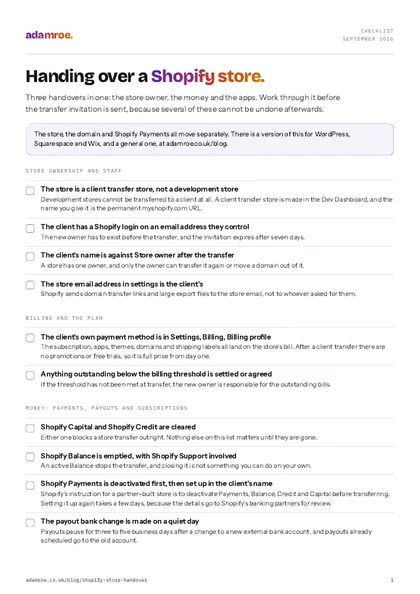 Free checklist, no email needed Handing over a Shopify store. Three handovers in one: the store owner, the money and the apps. Work through it before the transfer invitation is sent, because several of these cannot be undone afterwards. Download the checklist
Three handovers, not one
Here is the whole job on one screen. Most of it is ordinary admin, and the money and the domain are the two worth planning properly.
| What | Moves with the store? | What to do |
|---|---|---|
| The store, products and orders | Yes | Transfer ownership |
| Staff users and collaborators | They stay put | Review and remove after |
| The custom domain | No | A separate transfer |
| Shopify Payments and payouts | No | Deactivate, then set up again |
| App subscriptions | They bill to the store | Audit before the transfer |
| A paid theme licence | Stays with the store that bought it | Record where it was bought |
| Order history | Stays, and imports nowhere | Export the CSVs |
Custom domains are transferred separately: they do not ride along with store ownership (Shopify, change or transfer ownership, checked September 2026).
Three handovers, in order
The money bookends the whole job: cleared down before the store moves, and built back up in the new name afterwards. Capital or Credit stop a transfer outright, and a development store cannot be transferred at all.
First, what kind of store is this?
This decides whether there is a handover at all, so start here even if you are fairly sure.
A client transfer store is what a partner creates in the Dev Dashboard for a client: Stores, Create store, Client transfer store. The name becomes the permanent myshopify.com URL, so pick it as if it is. A development store is not the same thing: development stores “can’t be transferred to a client” (Shopify, client transfer stores, checked September 2026). Nor can a collaboration on a store the client already owns.
How to check it: see which Dev Dashboard tab it sits under. If it is not in the client transfer list there is no transfer to run, and the build has to be done again in the right container, products and all. That is the one thing on this page I would check on day one rather than on handover day.
Sort the money out before you touch the transfer
This is the easiest part to get in the wrong order and the hardest to undo, which is why it goes first.
Shopify says to deactivate every active financial product before transferring a partner-built store: Payments, Balance, Credit and Capital (Shopify, client transfer stores in the Dev Dashboard, checked September 2026). Two are hard blocks: Capital or Credit stop a transfer outright, and an active Balance must be emptied with Shopify Support involved (Shopify, change or transfer ownership, checked September 2026).
The order:
- Clear Capital and Credit. Until they are gone, the transfer will not run.
- Empty Shopify Balance, and ask Shopify Support to close it.
- Let the last payout land, and note the date.
- Deactivate Shopify Payments on the old owner’s details.
- Set the client’s business address and check the billing currency matches their location, which Shopify asks for to avoid tax problems.
- Agree in writing who handles refunds on earlier orders, and out of whose money. A conversation rather than a setting, and far easier before the store moves.
How to check it: Settings, Payments shows no active account and a zero balance. Worth being certain, because a transfer that is refused is refused with no reason given, and one that goes through can go through with the developer’s bank details still on it.
Transfer the store itself
Only the store owner can do this, and a store has one owner, so work out who that actually is before you book the call.
For a client transfer store: the Client transfer tab in the Dev Dashboard, the three dot menu on the store row, Transfer store, the client’s email. For a live store: Settings, General, Transfer store, Manage, “Transfer store to a new owner outside your business”.
Invitations expire after seven days (source as above), so send it when the client is at their desk. Anything outstanding below the billing threshold passes to the new owner, and after a client transfer the store “isn’t eligible for promotions or free trials”.
How to check it: sign out, have the client sign in, and look at Settings, Users. Their name should be against Store owner, and that is the moment it is genuinely theirs. A store that only looks handed over leaves the developer as the one person who can move the domain.
Then build the money back up, in the new name
Shopify Payments has to be in the client’s name, with their business details and bank account, and changes go to Shopify’s banking partners for review, sometimes with documents requested (Shopify, configuring Shopify Payments, checked September 2026). Allow a few days for it, not launch morning.
Two details on a store that is already trading cost real money, and neither is hard to plan for once you know. Payouts pause for three to five business days after a change to a new external bank account, and payouts already scheduled go to the old one (source as above). So change it on a quiet day, and agree who forwards that payout, in writing, before it lands. PayPal and the rest are changed inside their own accounts.
How to check it: place one real order, refund it, and watch the payout reach the client’s bank. It is the only test that really proves it, and it is a good one to do together.
The domain, and why .co.uk is its own job
The domain never moves on its own, and on a UK store there are two separate things to move. Neither is difficult, they just get mistaken for each other.
If it is registered through Shopify, Settings, Domains, Domain settings has both routes. “Transfer to another Shopify store” sends a link, takes up to 24 hours, and brings the forwarding addresses, DNS records and subdomains with it. “Transfer to another provider” shows the authorisation code straight away and takes up to seven days (Shopify, transferring Shopify domains, checked September 2026).
Four traps worth knowing about:
- The transfer link goes to the store email address, not to whoever started the transfer. If that is still the developer’s, the client never sees it and everyone sits waiting for an email that already arrived somewhere else.
- A 60 day wait applies after buying the domain, transferring it in, or changing the contact details, and a transfer unfinished within 30 days relocks it.
- A .co.uk cannot be transferred out by the merchant at all, nor .be, .de, .ec, .eu, .se or .ph. Shopify Support has to do it, so budget a ticket rather than an afternoon.
- HSTS. Move the domain to a platform without HTTPS and visitors see a browser error for 90 days.
Then the UK part, which has nothing to do with Shopify. Changing who legally owns a .co.uk is a Nominet registrant transfer, a different thing from moving a domain between registrars. It costs £10 plus VAT even for more than one name, and the new registrant has five days to accept (Nominet, transferring your domain name, checked September 2026). A store can be handed over in full with the domain still registered to the developer, which is nobody’s fault, just two systems that never talk to each other.
The domain is two jobs
The store can change hands completely while the name above the door still belongs to the developer. A .co.uk cannot be transferred out by the merchant at all, so that one needs a Shopify Support ticket rather than an afternoon.
How to check it: look the domain up and read the registrant name; it should be the business. Shopify sells no mailboxes either, only forwarding, so check every forwarding address lands somewhere the client owns.
The apps, the theme, and the bill nobody audited
App charges are billed on the store’s own bill and follow the store, not the person who installed the app (Shopify, app charges, checked September 2026). Every trial started during the build carries on under the new owner unless somebody looks, and nothing on the store tells you it is happening. So uninstall what nobody uses, write down what is left with what each costs a month, and have the client add their own card in Settings, Billing, Billing profile.
A purchased theme is “licensed only to the store that you originally bought it for” (Shopify, duplicating a store, checked September 2026), so it cannot move to another store later, including a duplicate. Record which store bought it, and download the theme files.
How to check it: read Settings, Billing after the first invoice. A few minutes of tidying now, or a shop quietly paying for four apps nobody uses until an accountant asks.
Nobody is backing this up
Shopify does not back up stores. That is the merchant’s job, through CSV exports, downloading the theme, or a backup app (source as above). Most people assume the opposite, and nobody should feel daft for that, it is exactly what you would expect a platform like this to do. It just means putting it in writing.
Export products, customers, inventory, orders and discount codes before the handover, plus the URL redirects from Content, Menus, View URL Redirects. An export of more than 50 orders is emailed to you and to the store owner rather than downloaded, so do it once you know whose inbox that is.
And the line to be clearest about: orders cannot be imported into a store through the Shopify admin. The history lives and dies here, which is the real difference from handing over a WordPress site, where the database goes with you.
Launch it, then take the keys back
The transfer and the launch are two steps, and it is very easy to assume the second happened because the first did. Everyone has done it. A client transfer store keeps its password page while it sits in the partner’s organisation, and the sitemap cannot be read in private mode (Shopify, finding your sitemap, checked September 2026). Taking that page down is its own tick box.
Then verify the domain in the client’s own Search Console and submit the sitemap, which is where Shopify SEO starts rather than ends. Remove the developer as a verified owner and delete their verification token, or they can re-verify whenever they like (Google, managing owners and users, checked September 2026). In GA4 the client needs the Administrator role to manage users at all.
Last, the access, which is skipped most often because the store works perfectly either way. After a transfer the partner “retains collaborator access by default”, collaborators never count towards the store’s user limit, and they lose access only after 90 days of inactivity (Shopify, collaborator accounts, checked September 2026). That is how a developer still has admin access years after the invoice was paid, almost always without meaning to. Three small jobs close it:
- Regenerate the collaborator request code in Settings, Users, Security. Any old code stops working, which matters if one was ever shared in an email thread.
- Review Settings, Users and remove anyone who has left. The Basic plan allows no extra staff users, so collaborator access is often the only way to give a developer a login without handing over the owner’s.
- Agree the access that stays, in writing, with a role limited to what that person needs.
The keys you did not take back
By default a transfer closes nothing. The partner retains collaborator access, collaborators never count towards the store user limit, and access is lost only after 90 days of inactivity. The store works perfectly either way, which is why this is the step that gets skipped.
How to check it: open the store in a private window with no login. The password page means it has not launched, and an old account that still opens the admin means the keys have not come back. Both are minutes to fix once you have looked. Handing over a Squarespace site has the same trap in a different shape.
What my Shopify handovers include
Shopify hosts itself and bills you directly, so there is no hosting from me on a shop. What there is:
- The store is set up on your account from the start, with the theme and the apps bought in your name, so there is no ownership transfer to run at the end. Shop starter includes up to three apps and Shop up to six, with the monthly cost of each written down. A build starts at £2,000.
- A shop on a monthly plan. Manage is £300 a month, three hours of changes plus an hour kept free so you get a reply within 12 working hours, and Grow is £675. A shop adds £37.50 on top, for checking the checkout still works after changes.
- A store I did not build starts with a take-on check, £200 for half a day: who owns it, where the payouts land, what the apps cost and who still has access, in writing, whether or not you carry on with me.
Before you ask
Questions people ask.
01 Can a Shopify development store be transferred to a client?
No. Shopify’s own documentation says a development store cannot be transferred to a client, so if the build lives in one, there is no handover button to press. The store a partner builds for a client is a client transfer store, created in the Dev Dashboard, and its myshopify.com URL is permanent once it is named. Work out which kind you have on day one, because moving later means rebuilding rather than transferring.
02 Does my domain transfer with the Shopify store?
No, the domain is a separate transfer and it does not ride along with store ownership. If it is registered through Shopify you move it from Settings, Domains, either to another Shopify store or out to your own registrar. A .co.uk cannot be moved out by the merchant at all, so that one needs a Shopify Support ticket, and changing who legally owns a .co.uk is a Nominet registrant transfer on top of that. Two jobs rather than one, and both are straightforward once you know they exist.
03 Who pays for the apps after a Shopify store changes hands?
The new owner does. App charges are billed through Shopify on the store’s own bill rather than to the person who installed the app, so every subscription added during the build carries on quietly under the new owner. Audit them before the transfer, uninstall what nobody uses, and hand over a list of what is left with what each one costs a month. It is the bill people are most often surprised by.
04 Can you check over a Shopify store that was handed to us?
Yes, that is a take-on check, £200 for half a day, and you get the findings in writing whether or not you carry on with me. I go through who owns the store, where the payouts land, what the apps cost a month and who still has access. After that, changes are £75 an hour, or Manage is £300 a month with a shop adding £37.50.
If you are handing a store over, do the money first and the domain second. Those are the two that cost real money in the wrong order.
And if you have just been handed one and you are not sure what you have got, don’t worry. It is usually all still there, it just needs somebody to go and look.
Tell me where the store is and I’ll tell you what I would check first. If you’d like the handover that never happened written down properly, I can get that sorted.
adamroe.