The website handover checklist
Eight things to hand over, so the next person has everything they need.

Adam Roe
The short answer
A website handover should include eight things: repository access and which branch is live, every credential in a shared vault, build and deploy steps someone can follow cold, the DNS records and where the domain is registered, the redirect map as shipped, analytics and Search Console transferred, a decisions log, and an honest list of what was deliberately left unfinished.
On this page
A new website goes live. It works, and everyone’s pleased. A few months later, someone new needs to change something.
That’s when a good handover really earns its keep.
While a site is being built, lots of the useful knowledge lives in people’s heads: why the build works the way it does, which settings really matter, what was left unfinished on purpose. A handover writes all of that down, so it stays with the site when people move on to other things.
I write handovers as if I won’t be around to answer questions. That isn’t gloomy, it’s just the job. When you hire a contractor for website delivery, the contractor is temporary, and the work should keep running happily long after the invoice is paid.
Here’s what should be in one.
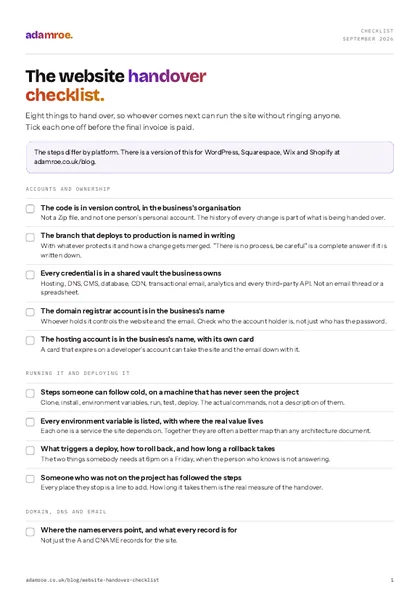 Free checklist, no email needed The website handover checklist. Eight things to hand over, so whoever comes next can run the site without ringing anyone. Tick each one off before the final invoice is paid. Download the checklist
The eight things
The eight things, by when
Repository access, the credentials, the build and deploy steps and the DNS can all be written in the first week. The redirect map and the decisions log fill up as you go, which turns the final handover into a quick check rather than a week of remembering.
1. Repository access, and which branch is live
Ideally the code lives in version control rather than a Zip file. If it isn’t there yet, that’s the first thing to sort, because the history of every change is a big part of what you’re handing over.
Access means the organisation, not the individual. If the repository sits in one person’s personal account, access depends on that one person, and people move on.
State plainly which branch deploys to production, whether anything protects it, and what the merge process is. “Push to main triggers a build” is a complete answer. So is “there is no process, be careful”, as long as it is written down rather than assumed.
How to check it: have someone outside the project clone the repository with their own account and build it. If only one person can get at the code, it has not been handed over yet.
2. Every credential, in a vault
Hosting, DNS registrar, CMS admin, database, CDN, transactional email, analytics, any third-party API the site calls.
In a shared vault, transferred to the client’s ownership. Not in an email thread, a spreadsheet or a document called passwords.docx. All three are really common, and all three are quick to move into a vault.
Two things that are easy to miss: the domain registrar, which is usually held by whoever bought the domain years ago, and the payment method attached to the hosting account. If the card that renews the domain expires and nobody notices, the domain can lapse, and that can take the website and the email down with it.
On Squarespace, Wix and Shopify, a password is not enough. Each of them has its own transfer, where the site itself moves to the owner’s account along with the billing, and a few parts of it cannot be undone afterwards. There is a checklist for each platform below.
How to check it: open the vault and read it against the list above. Then look at who the account holder is on the domain and the hosting, not just who knows the password.
3. How to build and deploy it
Written as steps someone can follow cold, on a machine that has never seen the project.
Clone, install, environment variables, run locally, run the tests if there are any, deploy. Each with the actual command, not a description of the command.
The test for this section: give it to somebody who wasn’t on the project and watch them try. Every place they stop is a line to add. How long it takes them to get it running is a good measure of the handover, and it’s well worth checking before you send it.
4. DNS, and where the domain is actually registered
Where the nameservers point. What every record does, not just the A and CNAME records for the site, but the MX records for email, the SPF, DKIM and DMARC entries, and any verification TXT records that will silently break a service if removed during a tidy-up.
Note anything with a TTL that matters, and anything that will need changing at the next migration. Without notes, nobody can safely change the DNS later, because nobody knows what each record is there for.
How to check it: export the zone file, or take one screenshot of every record, and write a line next to each saying what it is for and what breaks without it. An unlabelled TXT record is the one that gets deleted in a tidy-up six months later.
5. The redirect map, as shipped
If the build replaced an existing site, every old URL and where it now goes, as actually deployed rather than as planned.
This is the artefact that decides whether the search traffic survived the move, and it needs to outlive the project because the next person to touch the URL structure needs to know what is already pointing where. Chained redirects, a URL pointing at another redirect, which points at a third, are common on sites that have moved twice, and they only get untangled by someone holding both maps.
How to check it: take ten old addresses at random, including the busiest ones, open them, and watch each land on the right page in one hop. Record the date you did it.
More on why this belongs in the build rather than launch week in replatforming without losing search traffic. Getting the structure right in the first place is a sitemap decision, not a design one.
6. Analytics and Search Console, transferred not shared
Transferred. Ownership moved to a client account, not access granted from the agency’s or the contractor’s login.
Shared access can end when someone deactivates an account, and access to the historic data can go with it. Search Console in particular holds a comparison baseline you can’t recreate: if organic traffic drops in six months, the only way to know whether it’s a real problem is to look at what it did before, and that history isn’t stored anywhere else.
Verify the property against DNS rather than a file or a meta tag, so it survives the next rebuild.
How to check it: sign in to both with the business’s own account, with every developer and agency login signed out, and see the data. If you cannot, it was shared rather than transferred.
7. A decisions log, what was chosen, when, and why
This is the section that saves the most time, and it’s an easy one to skip when a project is busy.
Not a changelog. A short list of the decisions that shaped the build, each with the reasoning that was true at the time:
- Why this platform rather than the obvious alternative
- Why the URL structure is what it is
- Why that integration works the odd way it does
- What was tried and abandoned, and what went wrong with it
It saves people doing the same work twice. Without it, someone can spend a fortnight in month three finding out that the obvious improvement was already tried and broke something. With it, they read one paragraph.
It also saves going over old decisions again. When someone asks “why don’t we just…?”, the answer is already written down, with the reasons.
How to check it: ask for the three biggest decisions in the build and the reasons behind them. If they only exist in somebody’s head, they have not been handed over.
8. An honest list of what is deliberately unfinished
The other big time saver, and the one I’d keep if I could only keep one.
Every project ships with things that were consciously left. A known edge case. A temporary fix with a note on it. A page still waiting on its copy. An integration stubbed because the third party’s sandbox was down.
Without that list, the next developer finds them one at a time, in production, with no way to tell which were deliberate. Writing them down shows the difference between a gap that was agreed and one that was missed, and it means the good decisions you made get the credit they deserve.
Be specific. “Search doesn’t handle apostrophes, logged as [ticket], client agreed to defer” is useful. “Some rough edges remain” is not.
How to check it: every line says what was left, why, and who agreed it. A list with no names and no dates is a list of excuses waiting to be argued about.
It works differently on each platform
The eight things above are true wherever the site is built. How you do them is not.
On WordPress you are handing over accounts: the hosting, the database, the admin users and the licence keys for any paid plugin or theme. On Squarespace, Wix and Shopify you are transferring the site itself, and each of them has its own way of doing it, with its own list of what does not come with it.
So there is a checklist for each, with the platform’s own steps and a PDF to tick off:
- Handing over a WordPress website, where the hosting account, the plugin licences and the admin users are the whole job.
- Handing over a Squarespace site, where ownership transfers in one step and the billing has to change hands with it.
- Handing over a Wix site, where the site moves between accounts and the premium plan does not always move with it.
- Handing over a Shopify store, where the store owner, the payouts and the apps are three separate handovers.
Four platforms, four jobs
On WordPress you are handing over accounts: the registrar, the host, the admin users and the licences. On Squarespace, Wix and Shopify you are transferring the site itself, and the premium plan does not always move with it.
If you are not sure which of these you are on, the login screen tells you, and so does whoever built it.
What a good handover actually saves
The biggest saving isn’t the fortnight the next person would spend reading. It’s the decision they make at the end of it.
Someone picking up a build with no notes has two choices. Learn it, slowly, on a project that may already be running late. Or start again, which can feel quicker and usually costs a lot more.
A good handover makes the first choice much easier. The work that’s already been paid for gets kept, and the next person can get going with confidence.
Two choices, one cheaper
With no notes, learning it means going slowly on a project that may already be running late, and starting again feels quicker. A good handover makes learning it much easier, and the work that has already been paid for gets kept.
I’ve written more about what those first days look like from the inside in picking up someone else’s codebase. And if you’re wondering whether a project is heading for a thin handover, the early signs are usually there to see. Six early signs a project needs a hand covers what to look out for, and what to do about each.
The template
Copy this into a HANDOVER.md at the root of the repository, where it cannot be separated from the thing it describes.
# Handover, [project]
Last updated: [date] · Written by: [name, contact]

## Access
- Repository:            [org/repo] · production branch: [main]
- Vault:                 [link], transferred to [owner] on [date]
- Domain registrar:      [registrar] · account holder: [who] · renews: [date]
- Hosting:               [provider] · account: [who] · payment method: [whose]
- CMS admin:             [url] · first admin user: [who]
- Analytics:             [property], ownership transferred [date]
- Search Console:        [property], verified by [DNS TXT]

## Running it
1. `git clone …`
2. `[install command]`
3. Environment variables, see `.env.example`; real values in the vault
4. `[run command]` → [url]
5. Tests: `[command]`  ([n] tests, what they cover)

## Deploying
- [What triggers a deploy]
- [How to roll back, and how long it takes]
- [Who has permission]

## DNS
| Record | Value | Purpose | Notes |
|---|---|---|---|

## Redirects
Map as shipped: [link or path]. [n] rules. Last verified [date].

## Decisions
- [Date], [decision] because [reasoning at the time]

## Deliberately unfinished
- [Item], [why it was left], [agreed with whom, on what date]

## Known risks
- [Thing that will break, and roughly when]
Half of it can be filled in on the first day of the project rather than the last, which turns the final handover into a much lighter job.
What my own handovers include
Every website I build ends with this, because a site you cannot run without me is not finished.
- The domain is registered in your name from the start, and the hosting and platform accounts are yours. I get access to them, not the other way round. It is the first thing on every website package.
- A written guide at handover, built around the pages you will actually change, plus the logins, the decisions log and the honest list of what was left.
- If I host your WordPress site and you leave, you get a full backup and help moving it, free, with a month’s notice after the first three months. That is written into the hosting plan, not offered as a favour.
- If you have inherited a site with no handover, a take-on check is how it gets written: I go through the accounts, the code and the hosting, and you get the missing handover in writing whether or not you carry on with me.
Before you ask
Questions people ask.
01 Who should write a website handover?
Whoever built the site writes it, and whoever is paying asks for it in the scope before the work starts. If it isn’t in the scope it is easy for it to slip, so name it as part of the work, with a date, like anything else in the build.
02 When should a handover be written?
Start on the first day, not the last. Access, accounts and how to run the site can all be written down in the first week, and the decisions log fills up as you go. That turns the final handover into a quick check rather than a week of remembering.
03 What if my website never had a handover?
Don’t worry, it’s very fixable. Start with the accounts, making sure the domain, hosting and analytics are in your name. Then have someone spend a couple of days writing the missing handover from the site itself. It rarely means starting again.
04 Should my domain be in my name or my developer’s?
Yours, or your business’s. Whoever holds the registrar account controls the domain, and the domain controls your website and your email. If a developer or agency registered it for you, ask for it to be moved into your own account now, while everyone is on good terms.
Take the template. Put it in your own repos and change whatever you like. No need to credit me, I’d just like more of these to exist.
And if you’ve inherited a site with none of this, don’t worry. It’s very fixable, and it rarely means starting again.
Tell me where it is and I’ll tell you what I’d do first, whether or not you hire me. If you’d like me to write the handover that’s missing, I can get that sorted.
adamroe.