Your WordPress hero image is failing LCP. Here are the three causes to check.
Three causes to check, and why fixing the score is a different job.

Adam Roe
The short answer
WordPress has prioritised the hero image itself since 6.3, so if yours still fails LCP, something is getting in the way rather than missing. It is usually one of three things: a plugin re-applying lazy loading, a hero that is not a real img element, or an image that is simply too heavy. All three are fixable.
On this page
Here’s some good news if you look after a WordPress site. WordPress has got much better at loading the big image at the top of the page, and it does it all on its own.
For a while, the usual advice for Largest Contentful Paint was: WordPress lazy-loads your hero image, so remove loading="lazy". That was good advice at the time. Over a few releases core got smarter, and from WordPress 6.3 it no longer lazy-loads the first few images on a page, and it adds fetchpriority="high" to the image it believes will be the LCP element, automatically.
That’s a lovely bit of work from the people who build WordPress core, and most site owners got the benefit without ever noticing. Thank you, WordPress folks.
So if a modern WordPress site is still failing LCP on its hero, the useful question is what is getting in the way of the thing WordPress already does. That’s usually one of three causes, and it’s the sort of thing a Core Web Vitals audit on real pages exists to find, because all three look identical in a Lighthouse score and need completely different fixes. A caching plugin is great for some speed problems, but it won’t sort out any of them.
Three questions, in this order
About ten minutes to answer, and it saves an afternoon of guessing. Each no leads to the next question; each yes is your cause.
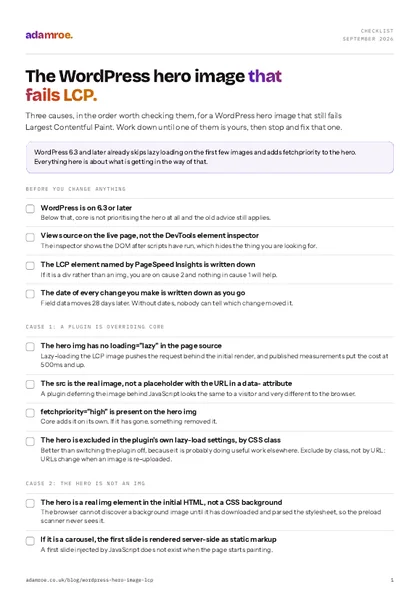 Free checklist, no email needed The WordPress hero image that fails LCP. Three causes, in the order worth checking them, for a WordPress hero image that still fails Largest Contentful Paint. Work down until one of them is yours, then stop and fix that one. Download the checklist
Cause 1: a plugin is overriding core
This one often turns up on sites that have already had some care put into speed, which does feel a bit unfair when you find it.
Many optimisation and lazy-load plugins were written before core did this, and they did a genuinely useful job at the time. Some still apply their own lazy-loading to every image on the page, including the first one, which undoes the exemption core has applied. Some also remove or don’t add fetchpriority, and a few defer the image entirely behind JavaScript.
It’s worth knowing what this one costs, because it’s more than it sounds. Lazy-loading the LCP image pushes the request behind the initial render, and published measurements put the cost at 500ms and up. Data from CoreDash cited in the Core Web Vitals community shows it clearly, around 79% of pages without a lazy-loaded LCP image record a “good” LCP, against roughly 52% for pages that still lazy-load it.
How to tell
View source on the live page. Actual source, not the DevTools element inspector, because that shows the DOM after scripts have run, and this is one of the few places the difference really matters. Find the hero <img>. If it has loading="lazy", or src pointing at a placeholder with the real URL in a data- attribute, a plugin is doing it.
The fix
Exclude the hero from the plugin’s lazy-load rules. The popular ones have that setting, usually as a list of CSS classes or image URLs to skip, so it’s one setting rather than a job. Do that rather than switching the plugin off altogether, because it’s probably doing useful work elsewhere.
How to check it: clear the cache, reload the live page and view source again. The hero <img> should have a real src, no loading="lazy", and fetchpriority="high". Check a page that wasn’t already cached, because a cached copy can keep serving the old markup for hours and make a good fix look like a failed one. And if the exclusion stops working after the plugin’s next update, don’t worry, it isn’t the fix coming undone: it was set on the image URL rather than the CSS class, and URLs change when an image is re-uploaded.
Cause 2: the hero isn’t an <img> at all
Nothing is misbehaving in this one, which is exactly why it takes a while to find.
Core’s prioritisation is a heuristic. It looks at images in the markup and picks the one most likely to be the LCP element. That only works if the hero is a real <img> reasonably early in the HTML.
And very often it isn’t one:
- A CSS background image. The browser cannot discover it until it has downloaded and parsed the stylesheet, which means the preload scanner never sees it and core never had an element to tag.
- A slider or carousel. The first slide is frequently injected by JavaScript after load, so the LCP element does not exist in the initial HTML.
- A page builder section that renders the hero inside a
<div>with an inlinebackground-imagestyle.
In all three cases WordPress is doing exactly what it should. There is simply nothing there for it to prioritise, so nobody has broken anything.
How to tell
This one is quick. In Lighthouse or PageSpeed Insights, look at what the LCP element actually is, because it names it for you. If that’s a div rather than an img, you’ve found your cause. Sliders give themselves away by having a later LCP than you would expect from the network waterfall.
The fix
Make the hero a real <img> in the markup where you can, which is the tidiest answer by a mile. Where you can’t, add an explicit <link rel="preload" as="image" href="…" fetchpriority="high"> in the head for that exact file, including any imagesrcset so you preload the right variant rather than the desktop one. This is the one to do slowly and carefully: a preload that doesn’t match what the page requests downloads the image twice.
For a carousel, the cleanest fix is usually to render the first slide server-side as static markup and let JavaScript take over afterwards.
How to check it: run the page through PageSpeed Insights again and read the LCP element it names. It should now be the <img> you made real, or the file you preloaded. Then look at the network panel: if the hero appears twice, the preload doesn’t match what the page actually asks for, which is almost always a missing imagesrcset. Miss that and you’ve made the page heavier while the score looks better.
Cause 3: the image is found, prioritised, and simply too heavy
The simplest cause, and still a very common one, so it’s worth ruling out before anything clever. Core has correctly identified the hero and given it fetchpriority="high", and the browser is gamely doing its best to download 1.8MB over a mobile connection.
Usually one of:
- No
srcset: so every device gets the desktop crop. A phone downloads a 2400px-wide image to display it at 390px. - A
srcsetthe theme generates and the page builder then overrides: which is a tricky combination to spot. - The wrong format. A JPEG where WebP or AVIF would be half the bytes at the same quality.
- An image with no intrinsic dimensions: which additionally costs you layout shift.
How to tell
The network panel, filtered to images, throttled to a slow connection. Sort by size. If your hero is the largest thing on the page by an order of magnitude, that’s your answer and you can stop looking.
The fix
Proper srcset and sizes, modern formats with fallbacks, and an actual look at the transferred size on mobile, which is the number that matters. A hero that arrives in under about 150KB is rarely your LCP problem.
How to check it: in the network panel, on a throttled mobile profile, read the transferred size of the hero rather than the file size in the media library. It’s an easy pair of numbers to mix up. If a phone is still pulling the 2400px crop, the problem is the sizes attribute rather than the srcset, because sizes is what tells the browser how big the image will be on screen. Skipping this check is how a site ends up with a perfect-looking srcset that never serves the small version to anyone.
Same score, three fixes
Reading the source is what tells them apart. The score is identical in all three.
If it’s none of the three, it isn’t the image
If you’ve been through all three and the hero is genuinely fine, you haven’t wasted the time. It means something upstream is holding the render, and there are only really two candidates.
The usual suspect is a render-blocking web font with no font-display and no preload, the browser holds text paint waiting for a font file, and on a text-heavy hero the LCP element may be the heading rather than the image. font-display: swap and a preload of the one font file used above the fold fixes most of it.
The other is server response time. If time to first byte is 800ms, nothing you do to the image recovers that, and the fix is hosting or caching rather than markup. This is the case where a caching plugin, or better hosting, really does help.
How to check it: in the network panel, sort by time and look at what finishes last before the page paints. A font file means the first of these two; a first byte that arrives late, before anything else has even started, means the second. Worth doing before any of the three image fixes, because if the server is the problem, a perfect hero still paints late and it looks as though nothing you did worked.
Fixing the score and fixing the cause are different jobs
This is the one distinction worth holding onto, and it saves a lot of effort and a lot of worry.
A lab score, Lighthouse, or the number PageSpeed Insights shows at the top, is a single simulated run on a simulated device. It responds to almost anything, including changes that do nothing for real users. It’s great for diagnosis, but it isn’t a good target on its own.
Field data: the Core Web Vitals report, drawn from real Chrome users over a rolling 28-day window, is what search actually considers. It only responds to the real problem, and because the window is 28 days, it will not tell you whether you were right for the best part of a month.
That lag catches everybody out at least once. You fix something, the lab score jumps, the field data doesn’t move for three weeks, and it’s only natural to think the fix didn’t work and try something else. It works a bit like the average on a water bill: you fix the dripping tap today, and this month’s figure barely notices, because most of the month happened before you picked up the spanner. So:
Diagnose in the lab, verify in the field, and write down the date you changed something so that when the field data does move you know which change moved it. Search Console’s Core Web Vitals report is the one to watch, not the score.
Why nothing moved yet
The lab score moves the moment you reload. The field data is a rolling 28 day window of real visits, so it holds mostly pre-fix visits for weeks.
One more encouraging thing: fetchpriority="high" on the LCP image is still far from universal across the web. It isn’t an exotic optimisation that everyone else has already done, so getting it working on your site is a real improvement that’s well within reach.
And if the hero got slower after a rebuild rather than always having been slow, the cause is often somewhere in the replatform. New templates change how the hero is built, and performance is easy to forget to re-check once launch is done. The same rebuild tends to take the page’s schema with it, for the same reason: both lived in the old theme. Which is why “Core Web Vitals measured on real pages” belongs in the handover, with the numbers as they were on the day it shipped.
Sources
- Don’t lazy-load your LCP image, Unlighthouse
- Fix “Largest Contentful Paint image was lazily loaded”, corewebvitals.io
- Largest Contentful Paint image was lazily loaded in WordPress, Webeyez
- Fix slow hero images and Core Web Vitals, corewebvitals.io
What I do about a slow hero
- Measured on real pages, then fixed at the cause rather than the score. Core Web Vitals is one of the six things the technical SEO work covers, alongside crawl and indexation, structured data, internal linking and redirect mapping.
- What I would do first: view source on the live page and work out which of the three it is. That takes about ten minutes, I do it for free, and it decides everything that comes after it. There is no point buying a fix before you know which fix you need.
- The fixed-price way in is the quick check: £400, a day of work. Crawl and indexation, Core Web Vitals on your five most important pages, your ten biggest issues in the order to fix them, and a 30-minute call to walk through it. It sits with the other two on the audit page.
- If it turns out to be the server rather than the image, that is hosting rather than markup. Hosting with the updates included is £50 a month: the hosting and the certificate, a backup every day, uptime and security monitoring, updates every month with a check afterwards, and the domain stays in your name.
Before you ask
Questions people ask.
01 Should I remove loading=“lazy” from my hero image?
Happily, on WordPress 6.3 and later you should not need to, because core already skips lazy loading for the first few images and adds fetchpriority high to the one it thinks is the hero. If your hero still carries loading lazy in the page source, something else put it there, normally an optimisation plugin. Exclude the hero in that plugin’s own settings rather than editing the theme, so the next update does not quietly put it back.
02 Will a caching plugin fix LCP?
Sometimes, and it is a fair thing to reach for, but not for these three causes. A caching plugin shortens the time to first byte, which genuinely helps if the server is slow, and some of them compress images too. None of that changes a hero that another plugin is lazy-loading, a hero that is a CSS background rather than an image element, or a 1.8MB JPEG with no srcset. Work out which cause you have first, then decide whether caching is part of the answer.
03 The PageSpeed score went up but Search Console has not moved. What now?
Wait, and write down the date you changed it. Nothing has gone wrong. The Core Web Vitals report is built from real visits over the previous 28 days, so a fix made today only shows once most of that window is made up of visits to the fixed page. The lab score moves the moment you reload, which is why it is tempting to try something else. Changing a second thing in the meantime is the common mistake, because nobody can then tell which change moved it.
04 Can you tell me which of the three my site has?
Yes, and that part is free. Send me the URL and I will view the source, look at what the LCP element actually is, and tell you which of the three you have, usually in about ten minutes. If you would like the fix made as well, Core Web Vitals measured on real pages and fixed at the cause is part of the technical SEO work, and the quick check is the fixed-price way in at £400 for a day.
If you’ve already tried a few things and the field data hasn’t moved, don’t worry. Usually it just means the fix was aimed at a different cause. Work out which of the three you have first, because each one needs a completely different fix.
Send me the URL and I’ll tell you which one it is. That part is free and takes me about ten minutes, and if you’d like a hand with the fix, I can get that sorted.
adamroe.