Structured data that actually earns something
The structured data that still earns a result, and how to check yours.

Adam Roe
The short answer
The good part first: structured data has never been a ranking factor. It earns two things: a result that looks different in search, and an unambiguous description of who you are. Ship BreadcrumbList, Product where you genuinely sell, Article, and one Person and Organization with sameAs. Skip HowTo, and never mark up your own reviews.
On this page
Structured data is a really satisfying job. You add it, the validator gives you a green tick, and the site feels a little more organised.
Some of it earns a visible result in search, and some does useful quiet work behind the scenes. Other types have been retired over the years, so markup that once earned something can still be sitting there, perfectly valid, quietly doing nothing. If that’s your site, nothing is broken and nobody made a mistake.
So this is a short guide to the structured data that still earns a result, the types that have been retired, and how to check whether yours is doing anything. It’s a small part of technical SEO, and a nice one to get right, because once it’s set up properly it mostly looks after itself.
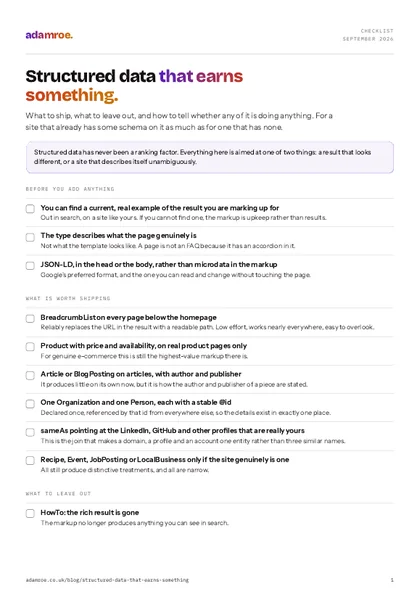 Free checklist, no email needed Structured data that earns something. What to ship, what to leave out, and how to tell whether any of it is doing anything. For a site that already has some schema on it as much as for one that has none. Download the checklist
The thing to be clear about first
Structured data does not improve rankings and never has. Google has said so consistently, and that takes the pressure off the job.
Think of it like labels on the jars in a kitchen cupboard. The labels don’t change what’s inside, but they make it much easier for someone else to find what they need and know what they’re looking at.
What it does is two things:
It can change how your result looks. Stars, a price, a stock status, a breadcrumb trail instead of a URL. That affects click-through, which is worth real money and is not the same thing as ranking higher.
It describes entities unambiguously. Who this person is, that this organisation is the same one as that LinkedIn profile, that these two pages are about the same thing. That matters increasingly for how systems that summarise the web understand a site, and it’s easy to overlook when the stars get all the attention.
If a schema type doesn’t do one of those two things for your page, it probably isn’t worth the upkeep.
Markup that fits the page
Structured data that matches what the page really is, so search engines and AI answers read it correctly.
What still earns a visible result
It’s a short list, and shorter than it was five years ago, which is good news: less to look after.
BreadcrumbList: reliably replaces the URL in the result with a readable path. Low effort, works nearly everywhere, and very easy to overlook.Productwith price and availability, for genuine e-commerce, still the highest-value markup there is.Recipe,Event,JobPosting,LocalBusiness: all still produce distinctive treatments, all narrow.Article/BlogPosting: no longer produces much on its own, but it is how the author and publisher of a piece are stated, which matters for the second reason above.OrganizationandPerson: the entity work. Rarely produces a visible result directly and does a lot of quiet work.
What has been retired or restricted
This is the part that’s easy to miss, and not your fault at all: the markup still validates, and plenty of tools still offer it.
HowTo: the rich result was retired, so the markup no longer produces anything you can see in search.
FAQPage: gone entirely. It was restricted to government and health sites in August 2023, and retired for everyone on 7 May 2026. No site gets the dropdown under its result any more. The type is still valid and search engines still read it, so it can stay on a page that genuinely has questions and answers on it. What is no longer worth doing is marking up ordinary text as questions and answers to chase a result that won’t appear, which goes against Google’s structured data guidelines and can lead to a manual action.
Review and AggregateRating on your own services: Google treats reviews a business marks up about itself as self-serving, and they aren’t eligible for review stars. If a plugin or theme lets you type in a star rating for your own business, it’s best left switched off, tempting as the stars look.
The general rule: if you can’t find a current, real example of that result out in search, for a site like yours, it’s probably adding upkeep rather than results.
The part worth doing properly: the entity graph
This is the work that pays off for a consultant, a contractor, or anyone trading under their own name, and it doesn’t get talked about nearly enough.
Declare one Organization and one Person node, each with a stable @id, once. Reference them by that @id from everywhere else on the site rather than repeating the details.
{
  "@context": "https://schema.org",
  "@graph": [
    {
      "@type": "Person",
      "@id": "https://example.com/#adam",
      "name": "…",
      "jobTitle": "…",
      "worksFor": { "@id": "https://example.com/#business" },
      "sameAs": [
        "https://www.linkedin.com/in/…",
        "https://github.com/…"
      ]
    },
    {
      "@type": "BlogPosting",
      "headline": "…",
      "author": { "@id": "https://example.com/#adam" },
      "publisher": { "@id": "https://example.com/#business" }
    }
  ]
}
Declared once, referenced by id
One Person with a stable id in the middle. Every page points at it rather than repeating the details, and sameAs joins it to the profiles. Change the job title in one place and the whole site agrees.
Two things make this worth the hour:
sameAs is the join. It’s how a domain and a LinkedIn profile and a GitHub account are understood as one entity rather than three unrelated things with a similar name. For a new domain trading under a personal name, this is one of the few pieces of technical work that genuinely helps early.
Referencing by @id means the details exist once. Change the job title in one place and every page is consistent. Repeating the author block in each template works at first, but over time the copies drift apart and the site ends up describing you in slightly different ways.
How to check it’s doing anything
The validator is a good first step, and a green tick is a genuinely nice thing to see. It only tells you the syntax is correct, though. For whether the markup is doing anything, these three are more useful.
Search Console’s enhancement reports. These only appear for types Google is actually processing on your site. If you added markup and no report appeared, nothing is being processed, and that is your answer.
The Rich Results Test on a live URL: which tells you what is eligible rather than what parses.
Click-through rate in the performance report, before and after, on the affected pages. This is the only measurement that reflects money. If the markup produced a visible change, CTR moves. If it didn’t, you’ve learned something useful: this type isn’t for you, and you can stop looking after it.
Four checks, in order
Each one answers a question the one before it could not. The validator says it parses, the Rich Results Test says it is eligible, Search Console says it is processed, and click-through says whether any of it paid.
Where it usually breaks
A rebuild strips it. The old schema lived in a theme file that didn’t get carried across, and rich results disappear a few weeks after launch, one of the quieter causes of a post-migration drop, and worth a row in the checklist alongside the redirect map.
How to check it: run one URL from each template through the Rich Results Test on staging, before launch, and compare it with the same template on the old site. Nobody notices this one at the time, because the pages still work and the validator has nothing to complain about. It shows up a month later as click-through quietly falling on the pages that used to have something extra in the result. The same rebuild often takes the performance work with it, for the same reason, which is why a hero image that suddenly fails LCP tends to turn up in the same month.
Two plugins both emit it. Contradictory Organization blocks on the same page, each describing the business slightly differently. It happens on a lot of WordPress sites, where an SEO plugin and a theme both add their own and neither is doing anything wrong. On Squarespace the platform generates its own, and adding anything beyond that needs code injection, which is one of the Squarespace SEO jobs that sit behind a plan.
How to check it: view source on the homepage and search for application/ld+json. More than one block claiming to be your Organization is the problem, and the Rich Results Test will show you both. Pick one source, switch the other off in its settings, then look again. Left alone, search engines have to guess which description of your business is the real one, and that is the opposite of what the markup is for.
It describes the design rather than the content. Markup saying the page is a FAQPage because the template has an accordion in it. The markup has to describe what the page genuinely is, rather than how the template looks.
How to check it: read the markup next to the page, on the page. Every claim in the JSON should be something a visitor can see with their own eyes. This is the one with real consequences: a mismatch between the markup and the visible page is a guidelines problem rather than a missed opportunity, and it is the kind of thing that arrives as a manual action in Search Console rather than a slow decline.
The short version
Ship BreadcrumbList, a single Person and Organization with sameAs, and Article on articles. Skip HowTo entirely. Only use FAQPage where there is a real question-and-answer block. Never mark up your own reviews.
Then check in Search Console as well as the validator. If nothing appears there, you can stop looking after that markup and put the time into structure, which is where the bigger returns are.
What I check on your schema
- Schema that matches what the page actually is, rather than bolted on for a rich result that will not appear. It is one of the six things a technical SEO audit covers, alongside crawl and indexation, Core Web Vitals, internal linking and redirect mapping.
- What I would do first: open Search Console’s enhancement reports and see which types are actually being processed on the site. If a type you have marked up is not listed there, nothing is reading it, and that is your answer. It takes five minutes and it saves arguing about the validator.
- On a new build, the entity graph is done once. One
Personand oneOrganizationwith a stable@idandsameAs, referenced from every template rather than repeated in each one. A keyword map with on-page SEO for every page is an extra at £400 on any of the four platforms, and the schema is part of it. - Kept tidy afterwards, because schema breaks quietly at the next theme update. Search care is £450 a month and keeps redirects, schema and internal links tidy, with a plain note each month of what moved and what I did about it.
Before you ask
Questions people ask.
01 Do I still need FAQ schema now the rich result has gone?
Only where the page genuinely has questions and answers on it, and there is no hurry to rip it out. The FAQ rich result was restricted to government and health sites in August 2023 and retired for everyone on 7 May 2026, so the markup no longer produces the dropdown under your result. It is still a valid type and search engines still read it to understand a page, so leaving it on a real FAQ section costs nothing. Adding it to a page with no questions on it is the part to stop doing.
02 Which schema plugin should I use on WordPress?
Whichever one the site already has, as long as there is only one. That really is the whole answer. The problem on most WordPress sites is not the plugin, it is two of them: an SEO plugin and a theme both emitting an Organization block that describes the business slightly differently. Pick one source, switch the other off, then open a page in the Rich Results Test to see which one survived. A third plugin added to fix the first two is the usual next step, and it rarely helps.
03 Can structured data get a site penalised?
Yes, if the markup describes something the page does not show. Google’s structured data guidelines ask that what you mark up matches what a visitor can see, and a mismatch can bring a manual action in Search Console. The three common ways in are marking up reviews of your own business, marking a page as an FAQ because the template has an accordion in it, and prices in the markup that no longer match the prices on the page. All three are quick to undo once you know they are there.
04 Can you set the schema up on our site?
Yes, and it is a small job rather than a project. Structured data is one of the six things the technical SEO work covers: schema that matches what the page actually is, rather than bolted on for a rich result that will not appear. On a new build, a keyword map with on-page SEO for every page is an extra at £400, and the schema is part of it. If you want it watched afterwards, Search care is £450 a month and keeps redirects, schema and internal links tidy.
If you’ve added schema and aren’t sure it’s doing anything, don’t worry. It’s a quick thing to check, and it usually just needs a little tidying.
Tell me what the site is and I’ll let you know which parts are earning their keep and which can go. If anything needs fixing, I can get that sorted.
adamroe.