
The short answer
For most small businesses, SEO comes down to four things in order: pages that say plainly what you do and where, a complete Google Business Profile with reviews, a site Google can find that works on a phone, and writing that answers what customers ask. Most of it you can do yourself. None of it works in a fortnight.
On this page
SEO for a small business is a lot less mysterious than it is made to sound, and a good part of it costs nothing but an afternoon.
Most of what gets a small business found is unglamorous: pages that say plainly what you do and where, a Google Business Profile that is filled in properly, and a site Google can find and read on a phone. The writing comes after that. Nobody needs a retainer to get the first three right, and plenty of businesses do them themselves.
So this is the honest version of SEO for a small business: what actually moves things, what you can do on your own, what is worth paying for, and how long any of it takes. Where a fact is Google’s, it is linked to Google’s own documentation, checked in October 2026. Where it is my view, I say so. And if you would rather hand it to somebody, that is what small business SEO services are for.
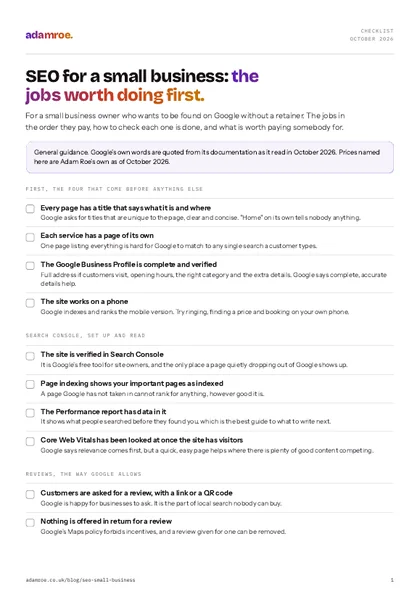 Free checklist, no email needed SEO for a small business: the jobs worth doing first. For a small business owner who wants to be found on Google without a retainer. The jobs in the order they pay, how to check each one is done, and what is worth paying somebody for. Download the checklist
What actually gets a small business found?
Four things, and the order matters more than people expect.
Pages that say what you do, and where. Google’s SEO Starter Guide asks for a title on every page that is “unique to the page, clear and concise”, and suggests it can include the location of the business. For a small business that usually means a page for each service, each with a title naming the service and the place. A single page that lists everything you do is hard for Google to match to any one search.
A complete Google Business Profile, with reviews. For anyone with local customers, the map results are often where the enquiries come from. Google says local results are “mainly based on relevance, distance, and popularity”, and that complete, accurate details and more reviews help. It also says “there’s no way to request or pay for a better local ranking”, which is worth knowing when somebody offers to sell you one.
A site Google can find, that works on a phone. Google indexes and ranks the mobile version of a site, so a page that is awkward on a phone is awkward for Google too. And a page Google has not taken into its index cannot rank for anything, however good it is.
Then the writing. Answers to the questions your customers actually ask, in words they would use. This is where the long-term growth is, and it only pays once the first three are in place.
In this order
Each one makes the next worth doing. Writing articles for a site Google cannot find, or for a business with no profile in the map results, is effort that has nowhere to land.
Can you do it yourself?
Yes, most of it. Google’s own page on hiring an SEO says it plainly: “If you run a small local business, you can probably do much of the work yourself.” These are the jobs I would do first on any small business site, and none of them needs anything paid for.
Set up Search Console
Search Console is Google’s free tool for site owners. It shows which of your pages Google has taken in, what people searched before they clicked through to you, and anything Google has found wrong. Verifying the site is a one-off job, usually a record added at your domain provider or a setting on your platform.
How to check it: the Page indexing report lists your important pages as indexed, and the Performance report has data in it.
What goes wrong if it is missed: you are guessing. A page that has quietly dropped out of Google, or a redesign that lost half the site, only shows up here.
Give every page a title that says what and where
Each page’s title is the blue headline in the search result. “Home” or the business name on its own tells Google and the reader nothing. “Boiler servicing in Milton Keynes” tells both of them exactly what they will get. Every platform has a field for it: on WordPress it is usually in the SEO plugin’s box under the page, and on Squarespace and Wix it is in the page’s SEO settings (the Squarespace and Wix settings are worth a look if you are on either).
How to check it: search Google for your own business and read the titles that come up. Each should say what the page is.
What goes wrong if it is missed: your pages compete with each other for the same vague words, and none of them clearly matches the search a customer actually types.
Fill in the Business Profile, and ask for reviews
Google’s own list is the full address if customers visit, opening hours, the right business category, and the extra details customers ask about. Then reviews. Google is happy for you to ask customers for reviews, with a link or a QR code. What its Maps content policy forbids is offering anything in return, discouraging bad reviews, or only asking the customers you expect to be happy.
How the map results choose
Google names three things behind local results: how well a profile matches the search, how far the business is from the person searching, and how well known it is. Distance is simply where you are. The other two are yours to work on, and neither can be bought.
How to check it: search for your business name and look at the panel that comes up. Hours, category, phone and website should all be right, and recent reviews should have a reply.
What goes wrong if it is missed: a half-finished profile loses to a complete one down the road, and a review offered something in return can be removed, along with the trust it was meant to build.
Make sure it works on a phone
Open the site on your phone and try to do the one thing a customer would: ring you, find your prices, book. Google says the pages are judged on page experience as well as content, though it is plain that it “always seeks to show the most relevant content, even if the page experience is sub-par”. A fast, easy page helps most where there is plenty of good content competing.
How to check it: the phone test above, and Search Console’s Core Web Vitals report once the site has enough visitors to fill it.
What goes wrong if it is missed: people leave before they ring, which costs more than any ranking.
What is worth paying somebody for?
My view: pay for the parts that need knowledge or time you do not have, and nothing else. Google itself says “a great time to hire is when you’re considering a site redesign (the earlier, the better)”, in its page on whether you need an SEO.
| Do it yourself | Worth paying for | Not worth paying for |
|---|---|---|
| Search Console set up | An audit when traffic drops and you cannot see why | A guaranteed first place |
| A clear title on every page | Help before a redesign or a move to a new platform | A “special relationship” with Google |
| The Business Profile and reviews | Working out which searches to aim each page at | Bought links |
| Checking the site on a phone | The technical fixes a platform hides | Submitting the site to search engines |
The right-hand column comes straight from Google. Its page on hiring an SEO says “no one can guarantee a #1 ranking on Google”, and to be wary of anyone claiming “a ‘special relationship’ with Google” or a “priority submit”. Its spam policies count buying or selling links for ranking as link spam. A good SEO will tell you all of this before you ask.
The technical side is the part where paying genuinely saves time: a site where half the pages are not indexed, a redesign that lost its rankings, or something slow that nobody can explain. A slow hero image on WordPress is a typical example, and so is structured data that is not doing anything. Both are quick once somebody knows where to look, and slow to find if you do not.
How long does SEO take to show?
Longer than anyone selling it would like to say. Google’s Starter Guide puts it plainly: “Some changes might take effect in a few hours, others could take several months”, and it suggests waiting “a few weeks” before judging whether a change worked.
When to look, in Google's words
Some changes show within hours and others take several months, so Google suggests waiting a few weeks before judging whether something worked. A title fixed today is not a failure if nothing has moved by Friday.
Changes to a Business Profile can show within days, which is unusually quick for anything in search, and fixing a page Google could not find or read can show within weeks. Competing for a search that other businesses already rank well for is the slow end, and that is months rather than weeks.
What about AI answers?
Google’s guidance on AI features is reassuringly short: “There are no additional requirements to appear in AI Overviews or AI Mode, nor other special optimizations necessary.” The basics above are the work. My view is that a clear answer near the top of each page is the best preparation there is, because it is the easiest part of a page for any summary to use.
What I would do on your site
- I would start with Search Console, the Page indexing and Performance reports, and then your Business Profile. Between them they usually say what to fix first.
- If something is wrong and you cannot see why, the SEO audit is the fixed-price way in: a quick check is £400 for a small site, covering crawl and indexation, Core Web Vitals on your five most important pages, your ten biggest issues in order and a 30-minute call. The full technical audit is £1,200.
- If you want it looked after afterwards, Search check is £150 a month and watches the site with a monthly note, Search care is £450 and makes the fixes too, and Search growth is £900 with the content and a call.
- If the map results matter most, local SEO setup is a one-off £1,200: the Business Profile claimed and filled in properly, your details made to agree everywhere they appear, and pages about the places you actually serve.
- What I do not do is link building or paid ads. They are their own jobs, and I am happy to point you at somebody who does them properly.
Before you ask
Questions people ask.
01 Do I need a blog for SEO?
Not to start with. A page for each service, with a title that says what it is and where, matters more than any article. A blog earns its place later, when it answers questions your customers actually ask, because those are searches your service pages will never match. One useful article a month that you keep up beats a burst of ten that stops in March.
02 Does my Google Business Profile count as SEO?
Yes, and for a business with local customers it is often the biggest single part. It is what shows in the map results, it is free, and Google’s own advice for ranking there is plain: keep the details complete and accurate, ask customers for reviews, and reply to them. It sits alongside the website rather than instead of it, because the profile links to the site and Google reads both.
03 Do I need to do anything different for AI answers?
No, according to Google. Its guidance for site owners says there are no additional requirements to appear in AI Overviews or AI Mode, and no special files or structured data to add. The same basics apply: pages Google can find and read, and writing that answers the question properly. My view is that a clear answer near the top of each page is the best preparation, because it is the easiest part for any summary to use.
04 Can I get my site checked before paying for anything?
Yes. The free website check on this site takes about 30 seconds and looks at speed on a phone, the padlock, out of date software and what Google is told about each page, then sends a fresh report every month, free. If it turns up something you cannot fix yourself, or you want to know why the site is not being found, the SEO audit is the paid next step, from £400.
If you have read this far and are not sure where your own site stands, that is completely normal, and it is quick to find out.
Tell me your web address and I will tell you the first thing I would look at. If it is something you can fix yourself, I will say so. If not, I can get that sorted.
adamroe.