Squarespace and Wix SEO: what the platform does, and what it can’t
Both platforms tick the mechanical boxes properly. Neither of them can decide what your pages are for, and that is the half that moves you.

Adam Roe
The short answer
Squarespace and Wix handle the mechanical half of SEO well: clean indexing, a sitemap, the certificate, and a checklist that flags empty fields. What neither can do is decide what each page is for, notice two pages chasing the same search, or write the words. That half is yours, and it is the half that moves you.
On this page
If you have worked through the Squarespace SEO checklist, ticked every line on it, and the site still is not showing up, nothing has gone wrong. You have finished the half the platform can help with.
That half is worth having, and both Squarespace and Wix do it properly. It is also the half that everybody’s site has done, which is exactly why it does not move you up. This is what each platform covers on its own, what is left on your desk afterwards, and the handful of things neither will ever do. If you are weighing the platform up in the first place, what a Squarespace site costs to have built is priced separately, because building it and making it findable are two different jobs.
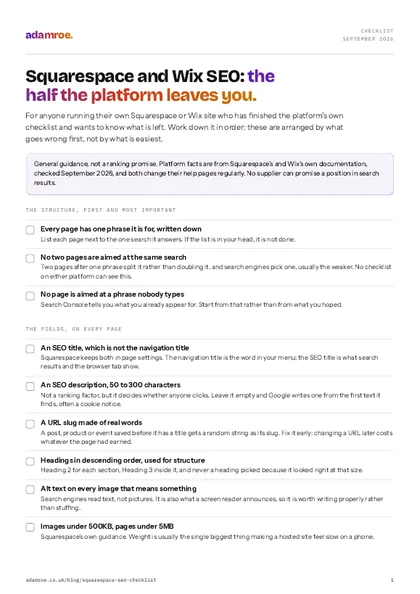 Free checklist, no email needed Squarespace and Wix SEO: the half the platform leaves you. For anyone running their own Squarespace or Wix site who has finished the platform's own checklist and wants to know what is left. Work down it in order: these are arranged by what goes wrong first, not by what is easiest. Download the checklist
What the platform actually does for you
More than its reputation suggests, and the parts it does are the parts that are genuinely tedious.
Squarespace states that all its sites are “built for clean indexing by search engines” (SEO checklist, last updated July 2026). In practice that means the sitemap is generated and kept current without you, the robots.txt file is written and maintained for you, and SSL is a single setting in the SSL panel rather than a certificate you install. On version 7.1 there is also an SEO report tool that scans the site and tells you which pages are missing alt text or an SEO description.
It also makes some decisions for you that a hand-built site gets wrong all the time. Blog post titles are formatted as Heading 1 automatically on 7.1. Title formats can be set once for the homepage, for collections and for collection items, so you are not typing the site name onto the end of every page by hand.
Wix takes a different route to the same place. Its SEO Setup Checklist builds a personalised list from three answers: your business name, whether you serve customers from a physical address or online, and up to three keywords (SEO Setup Checklist, checked September 2026). Then it walks you through connecting and verifying the site with Google.
So the mechanical layer is handled. Nothing on either platform is holding you back.
Who does which half
The mechanical layer is handled on both platforms, so nothing there is holding you back. What is left on your desk is the fields. The third column is looking at meaning rather than at fields, which is why no checklist can see it.
What is left on your desk, in the order to do it
Work down this list rather than across the platform’s one, because these are in the order that things go wrong.
One page per thing you sell, and no two pages after the same search. Two pages aimed at “kitchen fitting” do not double your chances, they split them, and search engines pick one, usually the weaker. Check it by listing every page next to the one phrase it is for. If two rows match, merge them or give one of them a different job. This is the single most common reason a well-built site sits still, and no checklist on either platform can see it, because both are looking at fields rather than at meaning.
An SEO title on every page, which is not the navigation title. Squarespace keeps both in page settings, and they do different jobs: the navigation title is the short word in your menu, the SEO title is what appears in search results and the browser tab. Squarespace prioritises content roughly in the order site title, SEO titles, page titles, blog post titles, headings (increasing your site’s visibility, last updated July 2026). Check by searching your own site name and reading what comes back. If the tab says “About” and nothing else, the SEO title is empty and the page is introducing itself as a menu item.
An SEO description on every page. Short and readable, and Squarespace asks for 50 to 300 characters. It is not a ranking factor, it is the sentence that decides whether somebody clicks. Check it with the SEO report tool on 7.1, which lists the pages missing one. Miss it and Google writes its own from whatever text it finds first, which is often your cookie notice.
URL slugs made of real words. This one catches people out: save a blog post, product or event before you have given it a title and Squarespace makes the slug a random string of characters. Check by reading your Pages panel with the URLs showing. Fix it before the page has been live long, because changing a URL later costs you whatever that page had earned.
Headings in descending order, and used for structure rather than size. Heading 2 for each section, Heading 3 inside it, and never a heading used because it looked good at that size. Check by reading only the headings on a page and asking whether they alone tell you what the page covers.
Alt text on every image that means something, and images under 500 KB. Squarespace recommends keeping images under 500 KB and whole pages under 5 MB. The weight is not just a search issue, it is what a phone on a slow connection has to pull down, and it is usually the single biggest thing making a hosted site feel sluggish. The same trap catches self-hosted sites, where a hero image quietly fails Core Web Vitals for exactly these reasons.
A redirect for anything whose URL you have changed. Both platforms let you map an old URL to a new one, and it takes a minute. Skip it and every link anyone ever made to that page now lands on a 404. If you are changing more than a handful, treat it as a small migration and map every old URL to a new one before launch rather than fixing them as complaints arrive.
Search Console connected, then left alone for a fortnight. On Squarespace it connects through the Analytics panel, under Search keywords. It is the only place that tells you what you are actually being found for, as opposed to what you hoped. Connect it on day one, because it only collects data from the day it is connected and there is no way to backdate that.
The order to check in
Work down this list rather than across the platform's one, because these are in the order that things go wrong. The SEO title is not the navigation title, and the description Squarespace asks for is 50 to 300 characters.
What neither platform will do, whatever you tick
This is the honest part, and it is short.
Neither will tell you a page is pointed at the wrong thing. A report can see that a field is empty. It cannot see that your “Services” page is trying to be five pages at once, or that the phrase you have chosen is one nobody types. Both platforms check presence. Judgement is not on the menu, and Squarespace says so plainly: its support team “can’t assist with SEO strategy”.
Wix’s checklist does not look at all of your site. It analyses the visible pages, and it does not analyse your blog or business solutions such as Wix Stores. On a shop, that is most of the site. It also needs a Premium plan and a connected domain before it can hook up to Search Console, and only the site owner and admin collaborators can open it at all.
Some jobs are behind a plan on Squarespace. Hiding a single page from search means adding a noindex tag through page header code injection, and code injection is only available on the Core, Plus and Advanced plans and some legacy ones (code injection, last updated September 2026). On the cheapest plan, that door is shut. The same applies to adding structured data beyond what the platform generates.
You cannot edit robots.txt on Squarespace. It is generated and maintained for you, which is the right trade for most sites and an immovable wall for the few that need something specific.
Neither one writes the words. Every platform’s advice ends at “add relevant content”, which is where the actual work starts.
What needs which plan
Everything on the left works on the cheapest plan. The two in the middle need code injection, which is Core, Plus and Advanced and some legacy plans. You cannot edit robots.txt on any of them.
Is Wix any different?
Less than the arguments suggest, and the old “Wix is bad for SEO” line is well out of date.
Wix hands you more direct control and more buttons. Squarespace hands you fewer buttons and picks sensible defaults. Both index cleanly, both generate a sitemap, both let you set a title, a description and a slug per page, and both let you redirect a URL you have changed.
Where they genuinely differ is who they suit. Wix’s checklist is built from your keywords and walks you through the setup step by step, which is friendlier if nobody on your side has done this before. Squarespace’s is a general list you read and apply yourself, which is quicker if you have. Neither difference decides whether you rank.
So choose on the editing experience rather than on search, because you are going to be in that editor for years. And if you are inheriting one rather than choosing one, the questions worth asking are in handing over a Squarespace site, where the search settings are only one of the things that quietly stay in somebody else’s account.
What I do on a platform site
Everything above you can do yourself, and plenty of people should. This is what it looks like when you would rather not.
- A new Squarespace build is from £600, and the pages get structured before anything is designed, one target per page, with the titles, descriptions, slugs and alt text done as the site is built rather than retrofitted. A five page site is £1,200.
- A keyword map with a target for every page is £400 on top of a build, and it is the document that stops two pages competing later. It is the part of this article I cannot do for you in writing.
- For a site that is already live and not being found, a quick check is £400: crawl and indexation, Core Web Vitals on your five most important pages, and your ten biggest issues in order, with a call to walk through them. A full technical audit is £1,200 when the site matters enough to want everything.
- Changes afterwards are £75 an hour, or a monthly plan if there will be enough of them to be worth one. There is no hosting charge from me on Squarespace or Wix, because the platform hosts itself and bills you directly.
- No ranking promises, on any of it. Anyone offering those is selling something, and the honest version is that this work makes a site findable and then the writing does the rest.
Before you ask
Questions people ask.
01 I finished the checklist and nothing changed. What now?
Give it a fortnight before you conclude anything, because indexing is not instant and rankings wobble while search engines take in changes. After that, the usual cause is not a missing field but two pages aimed at the same search, or a page aimed at a phrase nobody types. Open Search Console, look at what you already appear for, and start there rather than at the top of the checklist again.
02 Do I need to add code to Squarespace to do SEO properly?
Usually not. Almost everything that matters is a normal setting: the SEO title, the SEO description, the URL slug, the headings and the alt text. Code injection matters for two jobs, hiding a single page from search and adding structured data the platform does not generate. It needs the Core plan or above, so on the cheapest plan those two jobs are off the table until you upgrade.
03 Is Wix worse for SEO than Squarespace?
No, and the old reputation is out of date. Wix gives you more direct control, including its SEO Setup Checklist built from your own keywords. Squarespace gives you fewer knobs and sensible defaults. Both index cleanly. The thing that decides whether a site ranks is the structure and the writing, which is identical work on either, so pick the one you will actually enjoy editing.
04 Can you sort the SEO on a Squarespace site you did not build?
Yes, and that is a common way people arrive. It starts with a look at what is really there rather than a quote, because the fix is sometimes a morning of titles and redirects and sometimes a structure problem no title will rescue. A quick check is £400 and gives you your ten biggest issues in order, with a call to walk through them.
If you have ticked the whole checklist and the site is still quiet, that is the normal place to be, and it usually means the answer is in the structure rather than in a settings panel.
Send me the address and I will tell you which of the two it is, honestly, including when the answer is that the site is fine and the words are the problem.
adamroe.