What is a website migration, and what breaks during one
Most of a migration is not the moving. It is the list of things that quietly stop working while everyone is looking at the new design.

Adam Roe
The short answer
A website migration is moving a site to a new platform, a new host, a new domain or a new page structure. Sometimes all four at once. The pages themselves rarely cause trouble. What breaks is everything attached to the old addresses: search rankings, links, forms, analytics and, most painfully, email.
On this page
If somebody has quoted you for a website migration and you are not entirely sure what you are buying, that is a reasonable place to be. The word covers four quite different jobs, and which one you are doing changes what can go wrong.
A migration is moving a website: to a new platform, to a new host, to a new domain, or to a new structure of pages. Often more than one at once, which is where it gets interesting. If it is a rebuild you are planning rather than a move, building and delivering a site end to end is the other side of the same work.
The reassuring part first. The pages almost never cause the trouble. What causes the trouble is everything that was quietly pointing at the old addresses.
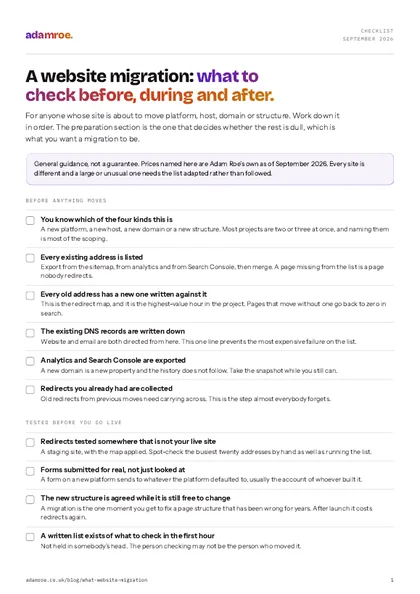 Free checklist, no email needed A website migration: what to check before, during and after. For anyone whose site is about to move platform, host, domain or structure. Work down it in order. The preparation section is the one that decides whether the rest is dull, which is what you want a migration to be. Download the checklist
What actually counts as a migration?
Four kinds, and it is worth naming which yours is before anybody quotes.
A new platform. WordPress to Squarespace, Wix to WordPress, one system to another. The content comes across, usually by hand, and the site gets built again on the new platform.
A new host. The same site, the same platform, a different company’s servers. The least dramatic of the four and the one most likely to be done without telling anyone.
A new domain. The business has changed its name, or is finally moving off a domain somebody registered in 2011. Everything about the site can stay the same and this is still the riskiest of the four.
A new structure. The site stays exactly where it is and the pages get reorganised: fewer pages, different sections, addresses that finally describe what is on them. People rarely call this a migration, and technically it is the same job.
Most real projects are two or three of these at once. A rebrand is usually a new domain, a new platform and a new structure in one weekend, which is three risks stacked and priced as one.
Four kinds of move
Naming which one yours is before anybody quotes is most of the scoping. A rebrand is usually a new domain, a new platform and a new structure in one weekend, which is three risks stacked and priced as one.
What moves, and what has to be made again?
This is the question that decides the price, and the honest answer is that less moves than people expect.
| What happens to it | |
|---|---|
| Words and images | Move, though often copied by hand rather than exported |
| Page layouts | Rebuilt on the new platform, every time |
| Forms | Rebuilt, and repointed at an inbox somebody actually reads |
| Blog posts | Move, and their addresses need mapping one by one |
| Redirects you already had | Carried across, and this is the step everybody forgets |
| Analytics history | Stays where it is, so take a snapshot before you go |
| Does not move on its own, and must be handled separately |
Between platforms, “export” usually means the words rather than the website. Some platforms have no export worth the name at all, so budget a platform change as a build with the content brought over rather than as a transfer.
What breaks, and why
Five things, in the order I most often find them broken.
1. Addresses, and the rankings attached to them. Search engines rate addresses, not pages. Move a page to a new address without a redirect and everything it had earned goes back to zero. The fix is a redirect map: every old address, the new one it becomes, tested before launch rather than after. It is dull work and it is the single highest-value hour of the project. If you are moving platforms specifically, keeping the traffic through a replatform goes through the mapping in detail.
2. Email. The domain points at both your website and your email, through separate records. Repoint the domain thinking only about the site and mail stops arriving, with no bounce and no warning. Somebody notices three days later when a customer asks why nobody replied. Write the existing records down before anything moves, and check mail sends and receives within the hour of the cutover.
3. Forms. They almost always look fine and almost always need repointing. A form on a new platform sends to whatever address the platform defaulted to, which is usually the account of whoever built it. Submit a real test through every form after launch and confirm it lands where a person will see it.
4. Analytics and Search Console. A new domain is a new property, and the history does not follow. Export what matters before the move so you have something to compare against, and reconnect Search Console on the new address on day one, because it only collects from the day it is connected.
5. The certificate. The padlock. On a new host or a new domain it has to be issued again, and if it lapses in the gap, browsers stop showing the site and show a full page warning instead. Check it on the day, on the real address, not on a staging one.
Five things that break
In the order I most often find them broken, each with what prevents it: every old address mapped to a new one and tested before launch, the existing email records written down before anything is repointed, a real test submitted through every form, an export taken and Search Console reconnected on day one, and the padlock checked on the real address on the day.
What makes one go smoothly
Not skill, mostly. Sequence.
The work that decides whether a migration is calm happens before anything moves: listing every address the site currently has, deciding what each one becomes, and agreeing the new structure while it is still free to change. The sitemap is an SEO decision rather than a deliverable, and a migration is the one moment you get to fix a structure that was wrong for years.
Then the boring discipline. Test the redirects somewhere that is not your live site. Keep the old site reachable until the new one is proven. Do the cutover on a morning when people are around, not on a Friday afternoon. Have a written list of what to check in the first hour, and actually work down it.
And whether you are the one moving or the one being moved to, the same paperwork matters at both ends. The website handover checklist is the list of what should exist before anyone says a site has been delivered, and a migration is a handover with extra steps.
What I do on a migration
- A migration check is £800, and it is the mapping done properly before you go live: every old address matched to a new one, redirects tested on staging, a launch-day checklist for search, and a call before you go. A bigger site gets a day rate quote first.
- The move itself is £400 a day, or a fixed price once the scope can be pinned down, which it usually can after the mapping.
- Email records get written down before anything is repointed. Not as a favour, as step one, because it is the failure that costs a business real money and nobody sees coming.
- The old site stays reachable until the new one has been checked on its real address.
- You get the redirect map as a file, so it is yours and checkable rather than something that happened inside somebody’s account.
Before you ask
Questions people ask.
01 Will we lose our Google rankings?
Not if every old address is mapped to a new one before launch. Rankings live on addresses, not on pages, so a page that moves without a redirect is a page Google has to find and rate again from scratch. Done properly you should expect a wobble of a week or two while the new addresses are taken in, then recovery. Done without a redirect map, losses are real and can be permanent.
02 Why does our email stop working when the site moves?
Because email and the website are both pointed at by the domain, and people move the domain thinking only about the site. Email is directed by separate records, and if the domain is repointed without copying those across, mail stops arriving with no warning and no bounce to tell you. It is the single most common migration casualty, and it is entirely avoidable by writing the records down first.
03 How long does a migration take?
The move itself is usually a day or two. What sets the calendar is the preparation: listing every existing address, deciding what each becomes, and testing the redirects somewhere that is not your live site. On a small site, plan a fortnight end to end. The cutover itself should be dull, and if it is dramatic, something was not tested.
04 Can we do it ourselves?
The move, often yes, especially platform to platform on a small site. The part worth getting help with is the redirect map and the launch checks, because those are where the expensive mistakes hide and they are hardest to spot from the inside. A migration check is £800, and it exists for exactly that: the mapping and the testing, before you go live rather than after the traffic has gone.
If somebody has quoted you for a migration and you are not sure what is in it, the useful question is which of the four kinds it is, and whether the redirect map is included or assumed.
Send me the quote and the current address and I will tell you what is missing from it, in writing, within two working days.
adamroe.