The sitemap is an SEO decision, not a deliverable
Page structure decides what a site can rank for, and it is settled before anyone opens a design tool.

Adam Roe
The short answer
The sitemap is an SEO decision because page structure settles what each page is allowed to rank for, and changing it later means a migration. So it’s worth settling on day one: the URL, the one query each page answers, its parent, the pages that will link to it and its schema type, before anyone opens a design tool.
On this page
- What a sitemap is actually deciding
- The test I apply to every page
- Where the real conversation is
- What the document should actually contain
- Depth, and a better rule of thumb
- URLs: decide once, never revisit
- When it’s a rebuild rather than a new site
- Why this is the SEO work that matters most
- Where the pages get decided on a build with me
- Questions people ask
On a lot of website projects, the sitemap is a quick slide. A handful of boxes, a few levels deep. It looks simple, everyone’s keen to see the designs, so it gets a nod and the project moves on.
That’s completely understandable, and if that’s how yours went, you’re in good company. But that little diagram decides a lot. It decides which searches your site has a real chance of showing up for.
It works like the floor plan for a house. Moving a wall on paper is easy. Moving it once the kitchen is fitted is a much bigger job.
The good news is that at this stage it’s all still text, so nothing in it is expensive to change. That’s why it’s the first thing on every build I do, including a fixed-price website package, before any design exists. Everything that comes after is built on it: the URL structure, the navigation, the internal linking, the schema, and the migration map if there’s an old site to move.
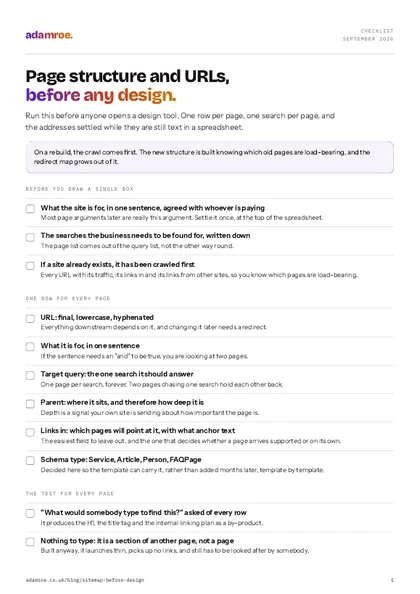 Free checklist, no email needed Page structure and URLs, before any design. Run this before anyone opens a design tool. One row per page, one search per page, and the addresses settled while they are still text in a spreadsheet. Download the checklist
What a sitemap is actually deciding
It’s more than a list of pages. It’s quietly deciding three things, and not one of them shows up on the slide:
What each page is allowed to be about. A page can rank for one thing well or five things badly. If your services are on one page with five sections, you have one page trying to answer five different searches, and it will usually struggle against sites that give each of those a page of its own. So give every page one sentence saying what it’s for, and one search it should answer.
How to check it: read that sentence back. If it needs an “and” to be true, you’re looking at two pages. The five-section services page is the version of this that costs the most, and it’s also the most common one there is, so don’t worry if you’ve got one.
What the hierarchy says. Depth is a signal. A page three clicks from the homepage with two internal links pointing at it is being described, by your own site, as a minor page. If that’s the service you most want to sell, it deserves a place much closer to the top. Decide now which pages the navigation carries, and which ones the body copy of other pages will point at.
How to check it: put the pages you most want to sell in one column and the number of links that will point at each in the next. A page you plan to spend money on, with two links planned to it, is a plan quietly disagreeing with itself, and at this stage it’s a couple of rows to change rather than a problem to solve.
What can be linked to later. Every future blog post needs somewhere to point. If there’s no page for a topic, the writing has nowhere to send authority, and the blog can bring in visitors without giving them anywhere useful to go next. So the structure has to hold the pages you will want in a year, not only the ones you need on launch day.
How to check it: take the next ten things you plan to write and name the page each one would link to. Every article with nothing to point at is a page missing from the sitemap, and it’s much cheaper to add it now than to write the article twice.
The test I apply to every page
One question: what would somebody type to find this?
If the answer is nothing, it isn’t a page. It’s a section of another page, and putting it on its own URL creates something thin that somebody still has to look after.
If the answer is the same thing another page already answers, you have two pages competing for one query. One of them will win, the other will hold it back slightly, and neither will do as well as a single combined page would have. It’s a really common one, and it usually happens for perfectly good reasons, like two teams each looking after their own part of the business.
If the answer is a real query nobody else on the site covers, it earns its URL.
The test for every page
Ask it of every page. If the answer is nothing, it is a section of another page rather than a page. If another page already answers the same thing, you have two pages competing for one query. If it is a real query nobody else on the site covers, it earns its URL.
That question also produces the H1, the title tag and the internal linking plan as a by-product, which is why doing it at sitemap stage saves time later.
How to check it: write the query in the row next to the page, then sort the spreadsheet by the query column. Two rows with the same query is the conversation in the next section. A row with an empty query is a section of another page, and if it gets built anyway it launches thin, picks up no links, and still needs looking after by somebody. Much nicer to spot in a cell.
Where the real conversation is
It’s rarely about how many pages there are. It’s about whether two of them are really the same page.
Say /services/web-design and /what-we-do/design were added in different years, for different good reasons. Deciding whether they’re one page or two needs somebody who remembers why both exist. That conversation takes some care, can easily fill a couple of afternoons on a mid-sized site, and is time well spent.
Combining two thin pages into one strong one is usually the right call. But it’s a content decision that affects search, so it’s best made on purpose at the start, with the people who know the content. Otherwise it tends to get decided late in the build, when the new template has one slot and there are two pages that could fill it. On a rebuild that decision also becomes a row in the redirect map, which is another reason it belongs in week one.
How to check it: search Google for site:yourdomain.co.uk followed by the query, and see how many of your own pages come back for it. More than one, and you’ve already got two pages sharing a search. Whichever of them Google picks is the one it’s decided is your answer, which is well worth knowing before you decide something different.
What the document should actually contain
A slide with boxes is a good start, but it’s hard to build from. A spreadsheet works better, with six things on each row:
| Field | Why it’s there |
|---|---|
| URL | Final, lowercase, hyphenated. Decided now, because everything downstream depends on it |
| What it’s for | One sentence. If it takes two, it may be two pages |
| Target query | The one thing it should rank for. One page per query, forever |
| Parent | Where it sits, and therefore how deep it is |
| Links in | Which existing pages will point at it, with what anchor text |
| Schema type | Service, Article, Person, FAQPage, decided here so the template can carry it |
The last two are the easiest to leave out, and they’re the ones that turn a sitemap from a picture into a plan. Leave links in out and pages arrive with nothing pointing at them but the navigation, which is the site saying very little about what they are for. Leave schema type out and it gets added months later, template by template, by somebody working out what each page was supposed to be. It’s a much shorter job when the row already says it, and the schema types that actually earn something is a short list.
The two that get left out
Six things on every row: URL, what it is for, target query, parent, links in and schema type. The last two are the easiest to leave out, and they are the ones that turn a sitemap from a picture into a plan.
How to check it: hand one row to somebody who wasn’t in the meeting and ask them to describe the page. If they can say what it’s for, what it should rank for and where it sits, the row is done. Whatever they have to ask you about is the field that’s still missing, which is a cheap and rather satisfying way to find it.
Depth, and a better rule of thumb
You’ll often hear that every page should be within three clicks of the homepage. It’s a helpful guide. The thing that really matters underneath it is how many internal links point at a page, and from where.
A page linked from the main navigation and from six relevant body paragraphs is well supported at any depth. A page whose only link is from a list on a sitemap page is going to find it hard to rank, whatever its click count.
So: money pages get navigation links and body links. Supporting pages get body links from the money pages they support. Anything that can only be reached from a footer list is worth a second look. It might belong somewhere else, or it might really be part of another page.
Links in, not clicks
Depth is the rule of thumb everyone quotes. Links in are the thing it is standing in for, so a page linked from the main navigation and from six body paragraphs is well supported at any depth.
How to check it: on a site that exists, crawl it with a tool like Screaming Frog and read the inlinks count for every page. On a plan, count how many rows name each page in the links in column. A page with one link, from the footer, will struggle however few clicks it sits from the homepage, and it’s a lot easier to fix in a spreadsheet than in a template.
URLs: decide once, never revisit
Two simple rules, and both take about a minute to settle on day one.
No dates in evergreen URLs. /blog/2026/10/handover-checklist starts to look dated within a year or so, and that can make people less likely to click it in search results. The publish date belongs in the metadata, where it can be shown or not.
No taxonomy in the path. /services/technical/seo-audit means that recategorising the page breaks the URL. Keep the path flat and let the category live in the data, the same reasoning that keeps blog posts at /blog/<slug>/ rather than under their category.
Both are quick to get right now, and both need a redirect map to change later.
How to check it: search the URL column for a four-digit year, and for every word that’s really a category rather than the thing itself. Then read the addresses on their own, with the page titles hidden. Anything you can’t guess the page from is worth another go while it’s still text in a cell.
When it’s a rebuild rather than a new site
One thing swaps round if there’s an old site to move: the sitemap comes after the crawl, not before it.
Crawl the existing site first, every URL, its traffic, its backlinks, its word count. Build the new structure knowing which pages are load-bearing, because a page with no internal links and forty inbound links from other sites can look unimportant from the inside and turn out to be one of the most valuable things you own.
Then every row of the new sitemap maps back to old URLs, and the redirect map grows naturally out of the process, so nobody has to put it together in a hurry during launch week.
How to check it: add an old URLs column to the plan and fill it in. Then go the other way: take the old site’s list, filter it to everything with organic traffic in the last twelve months or a link from another site, and check that every one of those appears against a row. A page that appears nowhere is a page being deleted, which is a decision worth making out loud rather than finding out about in February.
Why this is the SEO work that matters most
Most of technical SEO can be put right after launch, which is genuinely reassuring. Crawl errors, missing schema, slow templates, broken redirects. All of those can be fixed with some time and budget.
Structure is different. You can change it later, but changing it means a migration, and a migration is one of the biggest jobs a website goes through.
It’s the floor plan again. A wall is much easier to move while it’s still on paper. That’s also why the sitemap goes into the handover as an entry in the decisions log, so whoever looks after the site next can see what was decided and why.
Where the pages get decided on a build with me
- The structure comes before the design, on every build. It is the first thing that happens on any of the website packages, and the design is drawn afterwards, for pages that already have a job and one search to answer.
- If there is a site already, I crawl it first. Every address next to its traffic, the pages linking to it and the one search it should answer. The two pages that are really one page usually turn up in that spreadsheet on the first afternoon, which is the cheapest place to find them.
- The price is published, so the structure can be priced as you decide it. A five page site is £1,200 on Squarespace or Wix and £1,600 on WordPress. Another page on a layout already built is £100, or £200 with a layout of its own. A keyword map with one target for every page, its internal links and its schema is £400.
- The addresses and the domain stay yours. Twenty-five redirects are included, so old URLs that change still land somewhere, and beyond that it is £200 per 100 URLs. The domain is registered in your name from the start, whichever platform the site ends up on.
Before you ask
Questions people ask.
01 What is the difference between a sitemap and an XML sitemap?
They are two different things that share a name. The sitemap in a website project is the plan: which pages exist, what each one is for, and how they relate. An XML sitemap is a file at /sitemap.xml listing your live addresses for search engines, generated by the site rather than written by a person. The plan decides what gets built. The file only says what is already there.
02 How do I know whether two pages should really be one page?
Ask what somebody would type to find each one, and if the answer is the same thing twice, they are one page. Two pages chasing one search split the links and the attention between them, and neither does as well as one strong page would. Combining them is usually the right call, but it is a content decision, so make it at the start with the people who know why both exist, and redirect the old address.
03 Do I have to change my URLs when the site is redesigned?
No, and usually you should not. A redesign changes the templates rather than the addresses, and keeping the addresses keeps every link, bookmark and ranking pointing where it already points. Change them only where the structure genuinely changes, such as two pages becoming one, and then map every old address to its new home and open ten of them to check each lands in a single hop.
04 Is the sitemap part of a website package, or something we do ourselves?
It is part of the build, and it is the first thing that happens. The pages are agreed before any design is drawn, because the design is easier when every page already has a job and one search to answer. You are in that conversation with me, since the decisions need people who know the content and why both of those old pages exist. If you would rather do it yourselves, the test in this article is the whole method.
If a build is about to start, this is the perfect week to talk about page structure. It’s still a spreadsheet, so every change is quick and easy.
If you’d like a second pair of eyes on it, tell me what’s being built and I can get that sorted. I’ll reply within 12 working hours and let you know which parts of the structure I’d look at first.
adamroe.