What a website care plan actually covers, month by month
Two halves: the work that happens whether you ask or not, and hours for the things you ask for.

Adam Roe
The short answer
A website care plan has two halves. One is the work that happens whether you ask or not: updates, backups, the security certificate, and putting the site back if an update breaks it. The other is a set number of hours each month for changes you ask for. Everything else is quoted separately.
On this page
A website care plan is two things sold as one, and most of the confusion comes from that.
One half is the work that happens whether you ask for it or not: updates, backups, the security certificate, and putting the site back when an update breaks something. The other half is a set number of hours each month for the changes you actually ask for.
If you are trying to work out whether a monthly plan is worth it, that split is the thing to understand first, because the two halves fail in completely different ways. The first half is insurance. The second half is a budget.
Here is what each one covers, in plain terms, and what happens in a typical month.
A care plan in two halves
One half is the work that happens whether you ask for it or not, and it is insurance. The other half is a set number of hours each month for the changes you actually ask for, and that is a budget.
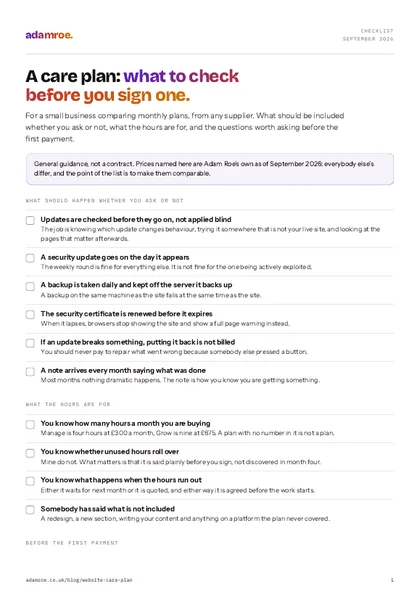 Free checklist, no email needed A care plan: what to check before you sign one. For a small business comparing monthly plans, from any supplier. What should be included whether you ask or not, what the hours are for, and the questions worth asking before the first payment. Download the checklist
What happens every month, whether you ask or not
None of this arrives as an email saying “we did some maintenance”. It is meant to be invisible, which is exactly why it is worth writing down.
Updates, checked before they go on. Plugins, themes and the platform itself release updates constantly, and most are dull. The job is not clicking “update all”, it is knowing which ones change how something behaves, applying them somewhere that is not your live site first, and looking at the pages that matter afterwards. A security update goes on the same day. The rest go on weekly.
A backup taken and kept somewhere else. Daily, and off the server it is backing up, because a backup living on the same machine as the site is not a backup. It is a copy waiting to fail at the same time.
The security certificate, renewed before it expires. This is the padlock next to your address. When it lapses, browsers stop showing the site and start showing a full page warning instead, and the first you usually hear is a customer ringing to ask if you have been hacked.
Putting it back when an update breaks something. This one matters more than it sounds. If I applied the update, fixing what it broke is not billable work. You should never be charged to repair something that only went wrong because somebody else pressed a button.
A note each month, saying what was done. Short, in English, and it exists so you can see you are getting something for the money in the months where nothing dramatic happens. Most months, nothing dramatic happens. That is the point.
What the hours are for
The second half is simple: a number of hours a month, used on whatever you like.
In practice it goes on text changes, a new page, a price that has moved, a team member who has left, a form that quietly stopped sending, photographs swapped after a shoot, and the small pile of “can we just” jobs that otherwise sit on a list for a year.
Two honest things about hours. They do not roll over, because a plan where they do is a plan that eventually owes you fourteen hours you will all argue about. And if you are not using them, you are on the wrong plan. Three months of unused hours means you should be paying less, and I would rather move you down than keep billing for something you are not getting.
Laid out across a month, the two halves look like this.
A month, week by week
The work that happens anyway runs whether anyone asks or not: updates checked weekly, a security one applied the day it appears, a backup every night kept off the server it backs up, and a note at the end saying what was done. Your hours only move when you do, and they do not roll into next month.
What a care plan does not cover
Being specific here is the difference between a plan people keep and a plan people resent.
- A redesign, or a new section of the site. That is a project, and it gets quoted.
- Anything on a platform I do not look after for you, which usually means a booking system or a shop your plan never included.
- Writing your content. I will put it up, format it and make it read properly on a phone. Deciding what it says is yours, or a copywriter’s.
- Things that are not the website. Email problems are usually the mail provider, not the site, though I will tell you which it is rather than shrug.
- Anything the hours have run out on, which is either next month’s hours or quoted at the hourly rate, and always agreed before it starts.
What it costs, in one place
| What | Price | Where it applies |
|---|---|---|
| Hosting, with updates and backups included | £50 a month | WordPress sites I host |
| Manage, 4 hours of changes | £300 a month | Any platform |
| Grow, 9 hours of changes | £675 a month | Any platform |
| Hosting and Manage together | £350 a month | WordPress |
| Hosting and Grow together | £725 a month | WordPress |
| A shop, on top of whatever is monthly | £37.50 a month | Any platform |
| Pay as you go, no plan at all | £75 an hour | Any platform |
Squarespace, Wix and Shopify host themselves and bill you directly, so there is no £50 there. The hours are the same wherever the site lives, because the work is the same.
If your site was built by somebody else, a take-on check comes first at £200, which is half a day of me reading what is actually there before promising to look after it. It is the honest order to do things in, and occasionally it ends with me saying the site needs fixing before any plan makes sense.
Do you actually need one?
Sometimes not, and there are two versions of not.
If your site genuinely never changes and it is on Squarespace or Wix, the platform does the updating and a plan with hours in it is money for nothing. Buy the hours when you need them.
If it is WordPress, something has to apply the updates, and “I will do it myself” works right up until the month you are busy. That is the month it breaks. Updates on their own start at £50 a month, and that is the floor, not a plan.
The middle case is the common one: a business that changes its site four or five times a year and has nobody whose job it is. That is what a plan is for. Whether it is worth it depends on how often the site actually changes, which is the next section.
What my plans include
Everything above is what my monthly plans are, not a general description of the industry.
- Hosting is £50 a month and it is WordPress only, on my account, with the domain registered in your name. Updates, backups, the certificate and putting things back are in that price.
- Manage is £300 and Grow is £675, on any platform, and the hours are for whatever you ask for.
- Three months minimum, then a month’s notice, and a free handover when you leave. Everything comes with you.
- A take-on check first for a site I did not build, £200, so I know what I am taking on before I promise anything.
- You get a note every month saying what was done, whether that was interesting or not.
Before you ask
Questions people ask.
01 Do I need a care plan if my site hardly ever changes?
Maybe not for the changes, but the updates still happen whether anyone is watching or not. A site nobody touches for a year is the one most likely to break, because the gap between its plugins and the current versions gets wider every month. If the site genuinely never changes, updates on their own are usually enough, and that costs less than a plan with hours in it.
02 What happens to my hours if I do not use them?
They go. They do not roll over, and I would rather say that plainly than have you find out in month four. It is the same as a gym membership, and the same logic applies: if you have not used the hours for three months running, you are on the wrong plan and I will say so.
03 Who owns the site if I stop paying?
You do, always. The domain stays registered in your name, the site is yours, and when a client leaves I hand everything over for free. Three months is the minimum, then it is a month’s notice. Nothing is held hostage, because a plan you stay on because leaving is painful is not a plan I want to sell.
04 Does a care plan mean my site will not go down?
No, and anyone promising that is selling something. It means the backups are there, the updates are tested rather than applied blind, and when something does break it gets put back rather than left. Most outages on a small site are the host, and the fix is knowing quickly and having something to restore.
If you are not sure which half you actually need, that is the normal place to start from, and it is a five minute conversation rather than a sales call.
Tell me what your site is on and I will tell you honestly whether a plan is worth it, including when the answer is no.
adamroe.