The last ten percent: why builds stall at ninety
Not the hard part. The part that rarely gets demoed, so it’s easy to leave out of the estimate.

Adam Roe
The short answer
A website project sticks at ninety percent because the last ten is the part nobody demos: error states, empty states, the admin experience, edge cases, email and accessibility. None of it is hard, and most of it was never in the estimate. The way out is a written list of every screen and every state, in launch order.
On this page
It’s really common for a website project to sit at about ninety percent done for a while.
That isn’t because anyone is bad at estimating. The first ninety percent is the part everyone sees in demos. The last ten percent mostly isn’t, so it’s easy to leave out of the estimate, and it often turns out to be more work than expected.
It’s a bit like decorating a room. The walls go on in an afternoon. The edges, the skirting boards and the fiddly bit around the light switch take the rest of the weekend.
If your project is sitting at ninety percent right now, don’t worry. It’s a very normal place to be, and it’s very fixable. Finishing it is most of what website implementation means in practice, so here’s exactly what’s usually in it.
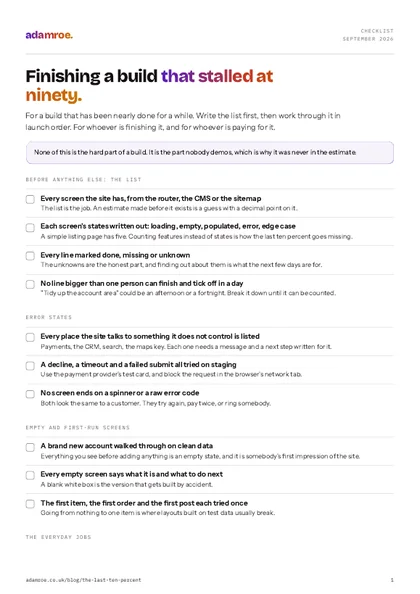 Free checklist, no email needed Finishing a build that stalled at ninety. For a build that has been nearly done for a while. Write the list first, then work through it in launch order. For whoever is finishing it, and for whoever is paying for it. Download the checklist
What the last ten percent contains
None of it is especially hard, which is the good news in all this. You just don’t tend to notice any of it until it’s needed.
Error states. What the user sees when the form fails, the payment declines, the API times out, the search returns nothing useful. Every one of these is a small design and copy decision, and there are often more of them than you’d think. The job is to list every place the site talks to something it doesn’t control, and write the message and the next step for each one.
How to check it: make them happen on the staging site. Use the payment provider’s test card for a decline, block the API in your browser’s network tab, submit the form with the service turned off. Anything that shows a spinner forever, or a message with a code in it, is a customer who will either try again and pay twice or ring somebody, and both of those are much easier to prevent here than to apologise for later.
Empty states. The dashboard with no data yet. The category with no products. The account page on day one. These are the first screens a new user sees, and during a build it’s natural to spend most of the time looking at pages full of test data, so they’re easy to overlook. Each one needs a line saying what it is and a button saying what to do next.
How to check it: make a brand new account on a clean database and walk through the site without adding anything. Every screen you reach before you’ve created any data is an empty state, and a blank white box is somebody’s first impression of the thing you’ve just built, which is a shame when a line of copy and a button is all it takes.
The admin experience. This one is about the people who’ll look after the site every day, and whether what you’ve built is pleasant for them to use. When the CMS is pleasant to use, the site gets kept up to date. When it’s awkward, updates slow down, and over time that can cost more than a bug would. So do the everyday jobs yourself first: add a page, swap a photo, publish a post, change the opening hours.
How to check it: sit with the person who will actually run the site and watch them add a page and change an image, without helping. Every place they pause is a field that needs a better label or a default, and none of that is their fault. If they can’t do it in front of you, they won’t do it in March either, and the site quietly goes out of date.
The boundaries. Long names, no names, 400-character names. Zero results, one result, ten thousand. The date that crosses a month boundary. The user who does the two steps in the wrong order. Write the limits down as you go, field by field, rather than meeting them for the first time in launch week.
How to check it: put the real content in, early, rather than the tidy test content. Real product names are longer than the design allowed for, real categories have one item in them, and real people fill in forms in an order nobody expected. It’s a much nicer surprise on staging than in front of a customer.
Everything about email. Transactional templates, the from-address, what happens on a bounce, whether any of it renders in Outlook. Email has a habit of turning up in the final week, so it’s worth starting early. List every email the site sends, who it comes from, and where a reply goes.
How to check it: send one of each to a Gmail address, an Outlook address and a phone, and look in the spam folder as well as the inbox. Check SPF, DKIM and DMARC are set for the sending domain. An order confirmation that quietly goes to spam looks exactly like a site that works, right up until somebody asks why nobody got their receipt.
Accessibility, if it was left until the end. When accessibility waits, it can grow from a quick check into bigger changes. Colour contrast is chosen during brand work, a custom dropdown needs to behave like a real one, and heading order needs to follow the content rather than the visual layout. Those are design decisions, so they’re much easier to get right from the start.
How to check it: unplug the mouse and do the main journey with the keyboard alone, watching where the focus outline goes. Then run one page through a checker such as axe DevTools, and read the headings on their own. Left to the end, the fixes land in the design rather than the code, which is the expensive version.
Six things it contains
Error states, empty states, the admin experience, the boundaries, everything about email, and accessibility if it was left until the end.
Why it’s so easy to miss
Three reasons, and they stack up on each other. None of them is anybody being careless.
Demos only show the happy path. A demo shows the thing working, because that’s what demos are for. Empty states and error messages rarely get a turn. So for months, everyone’s picture of “done” is built from the version where everything works, and the build really does look nearly finished, because the part everyone has seen is.
It’s spread out. No single item feels worth raising. “The form error message is a bit generic” isn’t a blocker. Put a lot of them together, though, and it can add up to weeks, and they tend to show up together during testing, when the launch date may already be public.
The estimate covered features, not states. “Contact form: 2 days” is a fair estimate for the form itself. It doesn’t include validation copy, the failure case, the spam handling, the confirmation email, or what happens when the CRM the form posts to is down. Those are five more small decisions, and none of them were in the two days.
One line of the estimate
Contact form, 2 days is a fair estimate for the form itself. It does not include the five more small decisions underneath it, and none of them were in the two days.
Keeping small jobs from piling up
The thing to watch for is work being put off, and you can often hear it in conversations before it shows up in the plan.
“We’ll pick that up later” said once is sensible planning. If it comes up a second time about the same thing, that’s a good moment to give it a date. It’s often something from the list above, because this work is fiddly rather than hard, and fiddly work is the easiest to put off for perfectly good reasons.
Work that’s put off doesn’t get any smaller. It arrives at the end, all at once, when there’s the least room for it. Picking it up in week two is much easier than finding it in the final fortnight. It’s one of the early signs a project needs a hand for exactly this reason.
How to estimate the last ten percent
Two things make a big difference here, and neither of them takes long.
Five states, one screen
For each screen: loading, empty, populated, error, and whatever the edge case is. A simple listing page has five states, and a screen with one line against it has been priced as the populated version and nothing else.
Count states, not features. For each screen: loading, empty, populated, error, and whatever the edge case is. A simple listing page has five states. It can make the estimate quite a bit bigger, which is never the fun part of the week, and it’s much closer to the real amount of work.
How to check it: count the rows in the estimate. A screen with one line against it has been priced as the populated version and nothing else, which is the version everybody has already seen.
Add a QA pass as a phase with a date, not a buffer at the end. A buffer tends to get used up by whatever else needed more time. A phase with a date on it and a defined scope tends to stay in the plan, because removing it is a clear decision that everyone can see.
How to check it: look for the dates. If the plan says QA with no start, no end and no list of what’s being tested, it’s a buffer with a better name, and it will quietly be spent on whatever ran late in the week before.
If that makes the number bigger than hoped, it’s a much easier conversation to have now than in launch week. It’s also one of the most useful things a written scope can do.
Picking one up at ninety percent
If I’m picking up a build at this stage, the first job isn’t code. It’s writing the actual list.
Every screen, every state, marked done, missing or unknown. It’s often a day or two of work, and it tends to come to more items than expected. That can feel a bit daunting, but it’s good news really, because now you can see all of it. When a project has felt “two weeks away” for a while, a clear list is often the thing that’s missing.
Then it gets put in order by what’s needed for launch, rather than what’s most enjoyable to do, and progress becomes something you can count again. Seeing that list get shorter each week does wonders for how everyone feels about the project.
How to check it: every screen in the site appears somewhere on the list, and every line has a mark against it. A line that says “tidy up the account area” isn’t finished yet, because nobody can tell whether it’s an afternoon or a fortnight. Break it down until each line is one thing one person can finish and tick off.
The rest of what those first two days look like is in picking up someone else’s codebase, and the list itself becomes the “deliberately unfinished” section of the handover, because some of it will be a conscious decision to ship without, and that’s fine as long as it’s written down.
The one thing worth taking from this
When a build feels ninety percent done, it’s usually the part everyone can see that’s finished. The walls are painted. The edges are still to do, and they deserve their own time in the plan.
That’s much easier to talk about early, while it’s still a planning conversation, than later on when everyone is keen to launch.
What finishing one looks like with me
- The list comes before any code. Every screen, every state, marked done, missing or unknown, and an estimate only after that. It is where picking up a stalled build starts, whoever built it and however it was left.
- The last ten percent is one of the things that work includes, next to codebase pickup, theming, integrations and migration: edge cases, error states, empty states and the admin experience, in the written scope rather than assumed.
- Priced by the day at £400 to start with, because the job only becomes clear once I am in the code. The written scope comes within two working days of the call, after I have looked at it rather than before, and the rest can become a fixed price once the shape is clear.
- Something you can open every week, and a running log of decisions. At the end you get what I found, what I changed and what the next person needs to know, written down, so the context doesn’t leave with me.
Before you ask
Questions people ask.
01 How do I know whether a build really is ninety percent done?
Count states rather than features. Go through every screen and write down its loading, empty, populated and error versions, then mark each one done, missing or unknown. The unknowns are the honest answer. A build where most screens have four ticks and the odd gap is close to finished, and one where half the states have never been opened is not, however good the demo looks.
02 Is the last ten percent scope creep?
Almost never, and it’s worth saying that out loud, because nobody needs to feel blamed for it. Scope creep is new work somebody asked for later; this is work the job always needed and nobody wrote down, because estimates get built from features and all the features were there. The fix is the same either way: list the missing states, price them as a phase with a date on it, and agree it in the open rather than quietly absorbing it.
03 Can we launch with some of it unfinished?
Yes, as long as it is a decision rather than a surprise. Write the list, mark what is shipping unfinished, and say what happens in the meantime: a plain error message instead of a clever one is fine, a payment that fails silently is not. Anything you choose to leave goes into the handover as deliberately unfinished, with who agreed it and when, so the next person does not treat it as a bug.
04 Can somebody else finish a build another developer started?
Yes, and it is most of what I am asked for. I read what exists, get it running, and write the list of every screen and every state before touching anything, because an estimate made before that is a guess. It is priced by the day at £400 to begin with, since the job only becomes clear once I am in the code, and the written scope comes within two working days of the call.
If yours is at ninety percent and has been for a while, the first useful step isn’t code. It’s the list: every screen, every state, marked done, missing or unknown.
It makes progress something you can count again. If you’d rather not be the one to write it, tell me where things are and we can work through it together. Thanks so much for reading, really appreciate it.
adamroe.